
What Is Parsing Data a Practical Explainer for Developers
Think about the last time you tried to use information you found online. Maybe you were copying product prices from a website into a spreadsheet, or trying to make sense of a massive log file from your server. It was probably a chaotic mess of text, numbers, and code, right? This is where data parsing comes in.
In simple terms, data parsing is the process of taking that messy, unstructured data and turning it into a clean, organized format that a computer can actually understand and work with. It's like a translator, converting a jumbled block of text—like the raw HTML of a webpage—into something neat and tidy, such as a spreadsheet or a JSON file. This conversion is the absolute first step to making any raw data useful.
From Chaos to Clarity: An Introduction to Data Parsing
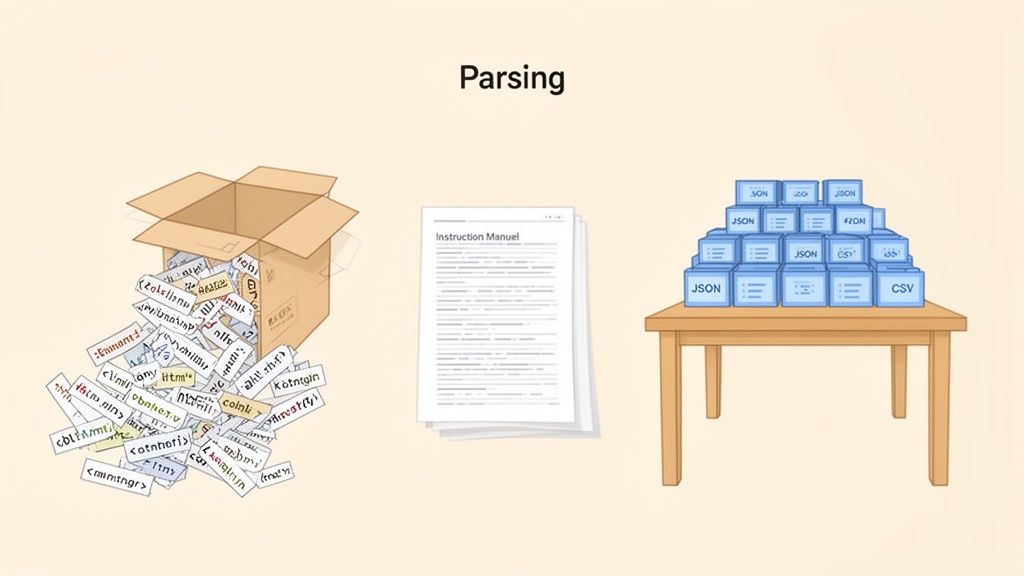
Here’s a good analogy: imagine you’ve just bought a giant, flat-pack bookshelf. You open the box and out spills a heap of screws, wooden panels, and mysterious plastic bits. Without the instruction manual, it’s just a pile of junk. In this scenario, that pile of parts is your raw data.
The act of parsing is like reading that manual. You're not creating new pieces; you’re just identifying each part, understanding its purpose, and figuring out how it all fits together. You're giving structure and meaning to what’s already there.
The Purpose of Parsing Data
The main goal of parsing is to make data understandable to a machine. A staggering 80% of all business information is locked away in unstructured formats like PDFs, emails, and random text on web pages. Without parsing, all that valuable knowledge is completely invisible to automated systems.
A parser follows a specific set of rules (its "grammar") to analyze a chunk of text and organize it logically. This is a fundamental process for tons of common tasks, including:
-
Web Scraping: Pulling specific product names, prices, and customer reviews from an e-commerce site’s HTML source code.
-
API Integration: Making sense of the JSON or XML data sent back from another service so you can use it in your own application.
-
Data Analytics: Turning raw, messy server log files into a structured table that you can actually analyze in a database.
-
Content Automation: Reading metadata from a Google Doc to automatically format and publish a new blog post.
Parsing is the essential bridge between chaotic, raw information and actionable insights. It translates the messy, human-readable language of the web into the clean, orderly language that software understands, powering everything from simple data entry to complex AI.
This transformation is about more than just tidying up data—it’s about unlocking its true potential. Once data is parsed, it can be sorted, searched, analyzed, and visualized. You can turn a confusing jumble of information into your most valuable asset. The entire world of data science, analytics, and business intelligence is built on this critical first step of bringing structure to chaos.
Here’s a quick look at how parsing transforms different types of raw data into ready-to-use formats.
Parsing Data At a Glance: From Raw to Ready
This table shows the journey from messy, raw data to a clean, structured output for a few common sources.
| Data Source | Raw Input (Before Parsing) | Parsing Goal | Structured Output (After Parsing) |
|---|---|---|---|
| E-commerce Page | Raw HTML code containing <div>, <span>, and <p> tags with product info. | Extract product name, price, and customer rating. | JSON: {"name": "...", "price": 49.99, "rating": 4.5} |
| Server Log File | A long text file with lines like [timestamp] INFO: User [ID] logged in. | Isolate timestamp, log level, and user action for analysis. | CSV: timestamp,level,action<br>2024-10-26,INFO,login |
| Weather API | A single block of XML text with nested tags like <weather> and <temp>. | Pull out the current temperature and weather conditions. | A Python dictionary or similar data structure for app use. |
| Financial Report | A multi-page PDF document containing tables of revenue and expenses. | Extract numerical data from tables into a processable format. | An Excel spreadsheet with organized columns and rows. |
As you can see, the parser's job is to apply a set of rules to find the signal in the noise, turning what was once unusable into a valuable, structured asset.
The Parser's Toolkit: Common Methods and Techniques
Now that we know why we parse data, let's get into the how. Developers have a whole toolkit of methods to choose from, and each one is built for a different kind of challenge. Think of it like a chef picking the right knife—you wouldn't use a cleaver when you need a paring knife. It would be messy and inefficient. The same logic applies here.
This toolkit has everything from laser-precise pattern matchers to parsers that understand the entire structure of a document. Knowing which tool to grab for the job is the key to building fast, reliable data extraction pipelines. Let's unpack the most common methods, starting with one of the oldest and most powerful tools in the box.
Regular Expressions: The Precision Tool
Regular Expressions, or Regex for short, are super-powered search patterns. They’re designed to find and pull specific bits of text out of a larger, unstructured mess. Imagine a "find and replace" feature on steroids that can spot complex patterns like email addresses, phone numbers, or timestamps buried in a giant string of text.
For simple, predictable data—like log files where every line follows the exact same format—Regex is incredibly fast and effective. But it has a reputation for being brittle, especially when you point it at complex, nested structures like HTML. One tiny change to a website's layout can completely break a Regex pattern, which is why it’s not the best choice for scraping modern web pages.
DOM Parsing: The Structural Blueprint
When it comes to navigating the complex architecture of HTML and XML documents, developers turn to DOM Parsing. The Document Object Model (DOM) is a programming interface that treats a web page like a tree. Every piece of the page—a heading, a paragraph, a link, an image—is a "node" on this tree.
DOM parsing works by loading the whole document into memory and building out this tree structure. Once the tree is built, you can easily travel through it to find specific elements using their tags, classes, or IDs. This is perfect for web scraping because it understands the page’s layout, letting you reliably target data like "the price inside the div with the class 'product-price'."
This approach is the bread and butter of modern web scraping. At a platform like Scrappey, this means we can effortlessly handle JavaScript-heavy pages using headless browsers. The parser doesn't just grab static elements; it navigates dynamic content like the infinite scroll on Amazon or eBay product pages. Python is the dominant language in these dev stacks, used by 69.6% of developers, with libraries like BeautifulSoup and Selenium powering 39.1% of proxy-integrated parsing jobs. This ensures that geo-targeted data from major markets like the US and EU stays fresh and compliant. You can dive deeper into the analysis of the web scraping market's future demands.
Streaming Parsers: The Memory Saver
The biggest downside to DOM parsing? It needs to load the entire document into memory. That's usually fine for a standard web page, but what if you're dealing with a massive, multi-gigabyte XML file? Trying to load it all at once would crash most systems.
That's where Streaming Parsers, like SAX (Simple API for XML), save the day. Instead of building a full tree in memory, a streaming parser reads the file piece by piece, from top to bottom. It triggers events as it hits different elements (like an opening tag or a closing tag), letting you process data on the fly without hogging memory. This makes it exceptionally efficient for truly enormous datasets.
Dedicated Libraries: The Specialists
Finally, for common structured data formats like JSON, XML, and CSV, the best move is almost always to use a dedicated library. These libraries are highly optimized, dependable, and dead simple to use.
-
JSON Parsers: These are built into most modern programming languages. They can convert a JSON string into a native data structure (like a Python dictionary) with just a single line of code.
-
XML Parsers: Libraries like lxml in Python give you powerful tools for both DOM and streaming parsing of XML files.
-
CSV Parsers: These libraries handle all the little quirks of comma-separated values, like dealing with quotes, different delimiters, and headers.
These specialized tools are the go-to choice because they handle all the tricky edge cases and complexities of their formats right out of the box. You won't have to reinvent the wheel. If you're looking to get your hands dirty, check out our in-depth guide on using Regular Expressions for parsing.
Putting Parsing into Practice: A Web Scraping Example
Theory is great, but seeing data parsing in action is where it really clicks. Let’s walk through a real-world web scraping scenario to see how these pieces fit together. We'll use Python, the go-to language for most data tasks, along with its popular libraries, Requests for fetching web pages and BeautifulSoup for parsing them.
Our mission is simple: grab the product name, price, and customer rating from a fictional e-commerce page. This is the kind of thing that powers everything from price monitoring bots to market research tools. First things first, we need the raw material—the page's HTML.
Step 1: Fetching the Raw HTML
Before you can parse anything, you need the data. The Requests library makes this part a breeze. We just send an HTTP GET request to our target URL, and the server sends back the page's raw HTML content.
import requests
The URL of the fictional product page we want to scrape
url = 'http://example-ecommerce-site.com/product/widget-pro'
Send a GET request to the URL
response = requests.get(url)
Store the raw HTML content
html_content = response.text
print(html_content) Right now, html_content is just a huge, messy string of text and tags. It’s completely unstructured and a nightmare to work with, which makes it the perfect candidate for parsing.
Step 2: Parsing with BeautifulSoup
This is where the magic happens. We'll hand our raw HTML over to BeautifulSoup, which will chew through that jumbled string and spit out a structured object based on the Document Object Model (DOM). Think of it as creating an interactive map of the webpage that we can navigate with code.
from bs4 import BeautifulSoup
Create a BeautifulSoup object to parse the HTML
soup = BeautifulSoup(html_content, 'html.parser') With our soup object ready, we can start pinpointing the exact data we want. By inspecting the page's source code in a browser, we can find the specific HTML tags, classes, or IDs that hold the information we're after.
For this example, let's say the product info is marked up like this:
-
The name is in an <h1> tag with the class product-title.
-
The price is in a <span> tag with the ID product-price.
-
The rating is in a <div> tag with the class star-rating.
Using BeautifulSoup's intuitive find methods, we can pull this data out with just a few lines of code.
Extract the product name
product_name = soup.find('h1', class_='product-title').text.strip()
Extract the price
price_text = soup.find('span', id='product-price').text.strip()
Often, you need to clean the data further (e.g., remove '$')
price = float(price_text.replace('$', ''))
Extract the star rating
rating_text = soup.find('div', class_='star-rating').text.strip()
Example: "4.7 out of 5 stars" -> 4.7
rating = float(rating_text.split()[0])
print(f"Product: {product_name}, Price: ${price}, Rating: {rating}")
Step 3: Structuring the Parsed Data
Getting the data is only half the job. To make it useful, we need to organize it into a structured format. A Python dictionary is perfect for this, letting us create key-value pairs that can be easily turned into other formats like JSON.
This whole process shows how a parser's toolkit gets used—from leaning on a DOM-based library to occasionally needing Regex for cleanup.
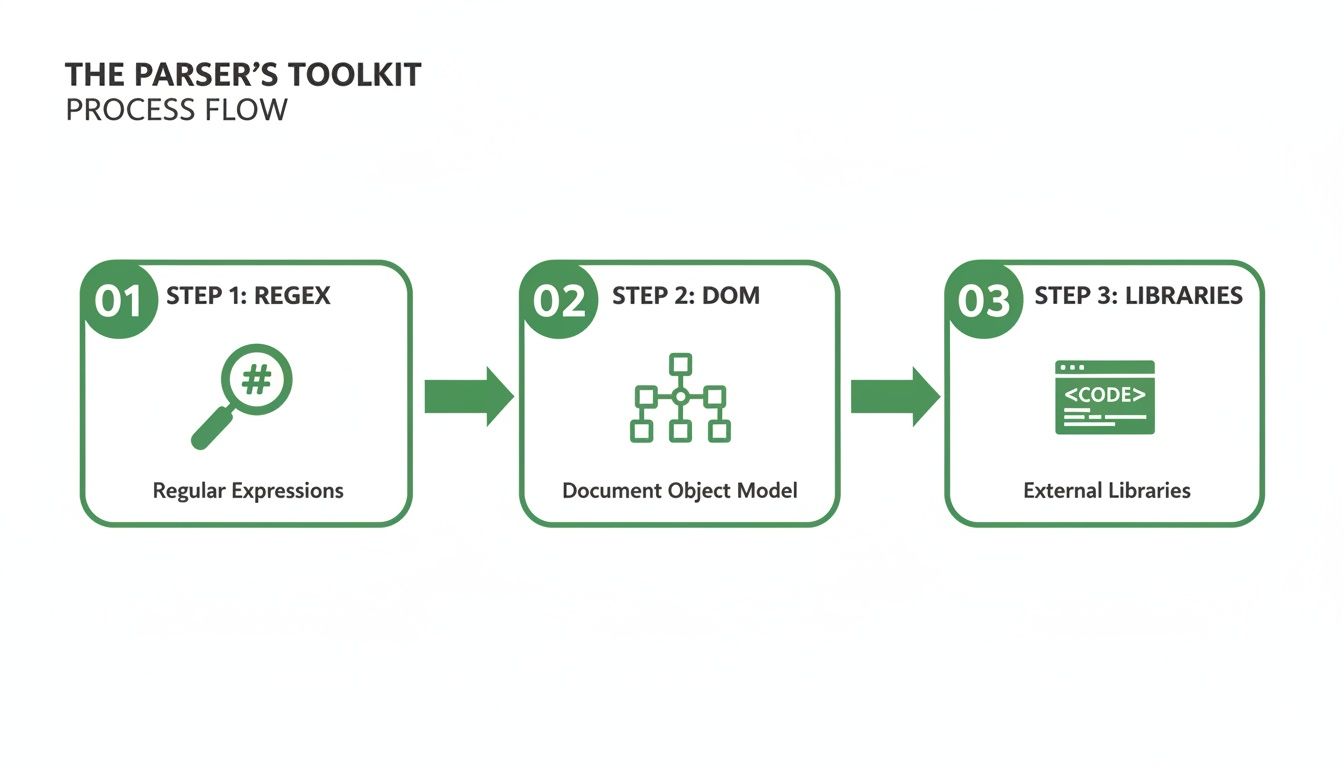
This visual flow shows how developers pick the right tool for the job: Regex for patterns, DOM for structure, and dedicated libraries for specific formats.
Now, let’s wrap our extracted data into a neat dictionary.
import json
Organize the extracted data into a dictionary
product_data = { 'name': product_name, 'price': price, 'rating': rating, 'source_url': url }
Convert the dictionary to a JSON string for easy storage or transmission
json_output = json.dumps(product_data, indent=4)
print(json_output) The final json_output is a clean, structured, and machine-readable version of the info we wanted. We've successfully turned chaotic HTML into a valuable piece of data. While web scraping is great for this, sometimes developers can handle it entirely for things like logos by using a dedicated logo API for more structured access.
If you want to dive deeper into scraping, check out our detailed guide on how to web scrape with Python.
Tackling the Modern Web’s Biggest Parsing Challenges
While the web scraping example we just covered works perfectly for simple, static websites, the modern web is a completely different beast. It's no longer just a collection of fixed documents; it's a dynamic, interactive experience. This evolution has thrown up some serious roadblocks that can stop a basic parser dead in its tracks.
The most common and frustrating challenge is JavaScript-rendered content. You see it all the time: product listings that load as you scroll down, prices that update without a page refresh, or interactive charts that draw themselves before your eyes. All that data is visible to you, but a simple scraper that only reads the initial HTML source code will see... well, nothing.
It’s like trying to read a book where the ink only appears after you stare at the page for a few seconds. The information is there, but your tool can't access it.
The Headless Browser Solution
To get around this, developers turn to headless browsers. A headless browser is just a web browser—like Chrome or Firefox—but without the graphical user interface. It runs in the background, executing JavaScript and rendering a webpage exactly as you would see it.
By using a headless browser, a scraper can patiently wait for all that dynamic content to load and then parse the final, fully-rendered HTML. This gives it access to the complete picture, including all the data that JavaScript brought to life. It’s the definitive way to handle today's interactive web, but it’s not without its own headaches, demanding more system resources and careful management.
Navigating Anti-Scraping Defenses
On top of dynamic content, many websites actively try to block automated access. These anti-scraping measures are designed to tell human visitors and bots apart, creating yet another layer of challenges for any data parsing workflow.
Common obstacles you'll run into include:
-
CAPTCHAs: Those "Completely Automated Public Turing tests to tell Computers and Humans Apart" are made to stop bots by presenting puzzles that are easy for people but tough for machines.
-
IP Blocks and Rate Limiting: If a server sees too many requests from a single IP address in a short period, it might temporarily or permanently block that IP to prevent being overwhelmed.
-
User-Agent and Header Checks: Websites often inspect the request headers to see if they look like they're coming from a real browser. A script with a missing or generic "User-Agent" is a dead giveaway.
The game has changed. Modern data parsing is no longer about simple HTML analysis. Success now hinges on intelligently navigating a complex environment of dynamic content, sophisticated bot detection, and ever-evolving web standards.
The growth of this complex environment is directly tied to the value of the data being extracted. The web scraping market is on a rocket ship, expected to hit $2.7 billion by 2035 as AI continues to redefine data extraction. This is critical since nearly 80% of top websites rely on JavaScript, a landscape where traditional tools often just don't work. You can read more about the AI revolution in the web scraping industry for a deeper dive.
How Platforms Like Scrappey Simplify Complex Parsing
Let's be honest: manually managing headless browsers, rotating IP addresses to distribute load, and keeping requests well-formed is a massive engineering project. It’s a huge distraction from the actual goal: getting clean, structured data. This is where a dedicated platform like Scrappey completely changes the game.
This screenshot shows the Scrappey dashboard, a centralized interface for managing complex web scraping tasks.
The key takeaway here is that a robust platform handles all the messy, difficult parts of the process, letting developers focus on the parsing logic itself.
Instead of building out a complicated infrastructure from scratch, you can make a simple API call. Scrappey takes care of all the heavy lifting behind the scenes:
-
Integrated Headless Rendering: It automatically renders JavaScript-heavy pages, so you always get the complete, final HTML.
-
Smart Proxy Rotation: It manages a huge pool of proxies, automatically cycling through IP addresses to stay within rate limits.
-
Reliable Request Handling: It maintains consistent browser configurations, manages sessions and cookies, and automatically retries failed requests, reducing failed requests on well-formed, authorized workflows.
By bundling these solutions, a platform like Scrappey delivers clean, ready-to-parse HTML right to you. Your job is simplified back to what it should be: figuring out what data you need and how to extract it. This approach slashes development time and eliminates the constant maintenance headache.
Best Practices for Efficient and Ethical Parsing
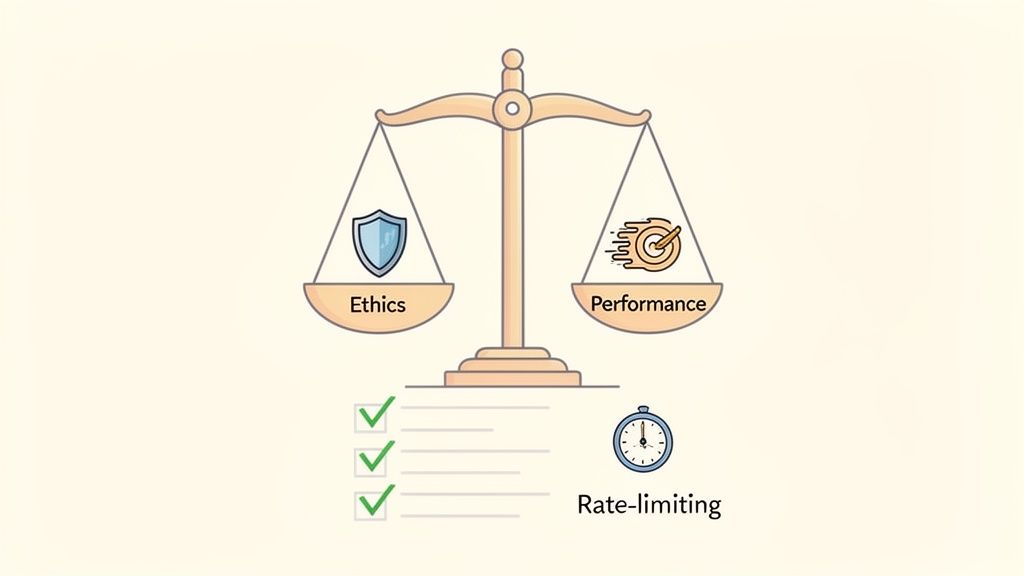
Parsing data isn't just about pulling information out of a file. It’s about building a system that’s fast, tough, and responsible. A great parsing pipeline is efficient and ethical—it won’t crumble at the first sign of trouble or cause harm to the sites you’re scraping. Nailing these best practices from the start will save you endless headaches down the road.
Performance is the bedrock of any solid pipeline. An inefficient parser is a slow, expensive beast that eats up server resources and takes forever to deliver results. By making a few smart choices upfront, you can build a system that hums along smoothly and scales without breaking a sweat.
Optimizing for Speed and Reliability
First things first: pick the right tool for the job. A full DOM parser might be perfect for wrestling with a complex, JavaScript-heavy webpage. But if you're tackling a massive, multi-gigabyte log file? A streaming parser is your best friend—it's far more memory-efficient and won't crash your system. The type of parser you choose will have the single biggest impact on your performance.
Next, get specific with your selectors. Instead of using a vague CSS selector like div > span, which could break with any minor layout tweak, aim for precision. A stable selector that targets elements by a unique ID or a durable class name will make your script much more resilient to changes over time.
Finally, build in solid error handling from day one. What happens if a page fails to load or an element you're looking for is missing? Your script shouldn't just crash and burn. It should log the error gracefully and move on, ensuring one small hiccup doesn’t bring your entire operation to a grinding halt.
The goal of efficient parsing is to create a system that is not only fast but also antifragile—it anticipates failure and is built to withstand the unpredictable nature of external data sources.
The web scraping world is always changing, and responsible approaches are no longer optional. By 2026, we expect to see even more legal clarity pushing ethical parsing into the spotlight. Using real-browser parsing is quickly becoming standard practice, and for good reason—it can slash script breakages from bot detection measures by 80%. For business intelligence teams, high-quality parsed data can feed machine learning models with up to 99% accuracy. Meanwhile, platforms like Scrappey are proven to cut maintenance costs by 60%, letting teams get their projects live faster. To keep up, check out the latest web scraping statistics and trends.
Upholding Ethical Standards
Speed is only half the battle. Ethics are just as critical. Being a responsible data collector protects you, protects the data source, and ensures you don't get your access cut off for bad behavior. It’s about being a good citizen of the web.
Here are a few non-negotiable ethical practices:
-
Respect robots.txt: Think of this file as the website's instruction manual for bots. Always check it and follow the rules. It tells you which pages you can access and how often.
-
Implement Rate Limiting: Don't slam a server with hundreds of requests a second. That's a great way to get blocked. Space out your requests to mimic human behavior and avoid overwhelming the site's infrastructure. One request every few seconds is a good place to start.
-
Identify Your Bot: Be transparent. Use a clear and honest User-Agent string in your request headers. This tells website admins who you are and gives them a way to contact you if your bot is causing problems.
By pairing performance optimizations with a strong ethical framework, you can build data parsing pipelines that are sustainable, respectful, and incredibly effective. If you want to dive deeper into navigating complex site defenses, check out our guide on ethical and legal approaches to handle CAPTCHA.
How Parsing Powers AI and Big Data Analytics
Learning how to parse data is more than just a technical skill—it’s your ticket into the most exciting fields in tech. Web scraping is just the beginning. At its core, parsing is the engine that fuels innovation in artificial intelligence and big data by turning raw, messy information into clean fuel for advanced systems. Without it, even the most powerful algorithms would starve.
Every major leap forward in machine learning is built on a foundation of cleanly parsed data. Whether it's for natural language processing or computer vision, an AI model is only as good as the information it’s trained on. This is where parsing becomes absolutely essential.
Fueling Intelligent Systems
For an AI to learn anything, it needs huge amounts of labeled, organized examples. The incredible progress we’ve seen in AI, especially with systems like Large Language Models (LLMs), really highlights just how critical data parsing is for processing massive datasets and making sense of complex human language.
Think about these real-world applications:
-
Natural Language Processing (NLP): How do models learn to understand us? By analyzing millions of sentences. Parsing breaks down articles, books, and websites into structured pieces like words, phrases, and grammatical trees that an AI can actually digest.
-
Computer Vision: Even image-based AI depends heavily on parsing. It's used to pull out and structure metadata from image files—things like captions, tags, and GPS coordinates—which creates the context a model needs to understand what’s in a picture.
Data parsing is the crucial first step in the AI value chain. It transforms the world’s unstructured information into the precise, high-quality training data that enables machines to learn, reason, and create.
Taming Big Data Streams
Parsing is just as vital in the world of big data, where organizations are trying to make sense of enormous, high-speed streams of information. In this kind of environment, raw data from millions of sources floods in every second. Parsing is the only way to bring order to that chaos in real time.
For instance, a global e-commerce platform generates terabytes of log files every single day. Real-time parsing is used to instantly pull critical events from these logs—like user clicks, transaction failures, and server errors. This structured output is then piped directly into analytics dashboards, letting engineers spot and fix problems the moment they happen. In the same way, data from IoT sensors on a factory floor is parsed to monitor equipment health, predict maintenance needs, and head off costly downtime.
Ultimately, once you understand what data parsing is, you see a universal truth: structure is power. It’s a future-proof skill that puts any developer or data professional right at the heart of our data-driven world.
Frequently Asked Questions About Data Parsing
Diving into the world of data extraction can kick up a lot of questions. As you go from knowing what data parsing is to actually doing it, a few topics tend to trip people up. This section cuts through the noise and gives you clear, direct answers to the most common questions we hear.
We’ll sort out some key differences, touch on the all-important legal stuff, and help you figure out the best tools for the job.
Is Data Parsing the Same as Web Scraping?
Nope, they're two different sides of the same coin. Think of it like this: web scraping is the act of fetching the raw data from a website—like downloading the entire HTML file for a page. Data parsing is what you do next. It's the art of sifting through that messy file to find and pull out the specific nuggets of information you actually need.
-
Scraping is the collection of the raw, unstructured file.
-
Parsing is the extraction and structuring of the good stuff from that file.
You can't really have one without the other. Successful web scraping is pretty useless if you can't parse the data you collected into something clean and organized.
Is Parsing Data Legal?
Parsing itself is completely legal—it’s just a computational process, like running a calculation in a spreadsheet. The legal questions really pop up around how the data was gathered in the first place, which brings us back to web scraping. For the most part, scraping publicly available data is fine, but there are some critical ethical and legal lines you should never cross.
The golden rule is to cause no harm and respect the website's terms of service. That means not hammering a site's servers with too many requests, steering clear of private or copyrighted info, and always honoring the robots.txt file.
Stick to ethical guidelines, and your projects will be responsible, sustainable, and on the right side of the law.
What Is the Best Language for Data Parsing?
When it comes to data parsing and web scraping, Python is the undisputed king. And for good reason. It boasts an incredible ecosystem of libraries like BeautifulSoup, Scrapy, and lxml that make the whole process surprisingly straightforward. These tools are built to navigate complex HTML and pull out data with just a handful of code.
Sure, other languages like JavaScript (with Node.js) or Java can get the job done. But Python’s mix of simplicity, powerful libraries, and a massive, helpful community makes it the go-to choice for almost anyone tackling data extraction today.
Ready to stop wrestling with anti-scraping measures and focus on what matters—getting clean data? Scrappey handles the entire complex web scraping infrastructure for you, from headless browsers and proxy rotation to session handling. Get the clean, parse-ready HTML you need with a simple API call. Start building faster and more reliably today at https://scrappey.com.