
Mastering Proxy IP Rotation for Scalable Web Scraping
Proxy IP rotation is a pretty simple concept at its core: it's the process of automatically assigning a new IP address for each connection you make. Instead of sending thousands of requests from a single, static IP, this technique spreads them across a large pool of different IPs. The result is that your traffic stays within per-IP rate limits, which means fewer failed requests and more reliable data collection.
A quick note on authorized use: this guide assumes you are collecting public data you have permission to access, in line with each site's terms and applicable law.
Why Proxy IP Rotation Matters for Modern Data Collection
Reliable web scraping today has as much to do with how you distribute your requests as with the elegance of your script. When every request comes from a single IP, you concentrate all your traffic on one address, which quickly runs into per-IP rate limits and starts returning failed requests. Proxy rotation spreads that load across many addresses, so you stay within each site's limits and keep your data pipeline running.
This has become more important over time. E-commerce sites, social platforms, and search engines all apply rate limits and bot detection systems to incoming traffic, and they track request patterns per IP. Distributing your requests sensibly is how you keep working with that infrastructure rather than against it.
The Problem With Static IPs
When a single IP address makes hundreds of requests per minute, it quickly hits the limits a site sets for any one address. The most common mechanisms you'll run into include:
-
IP Rate Limiting: Sites cap the number of requests an IP can make in a given window. Go over that limit and you'll start seeing HTTP 429 (Too Many Requests) and other failed responses until the window resets.
-
IP Reputation Scoring: Many sites assign a reputation score to each connecting IP. Addresses associated with high-volume automated traffic tend to score lower, which can mean more CAPTCHAs or more failed requests.
-
Geographical Routing: A lot of platforms serve different content based on a user's location, which they determine from their IP. A static IP in the wrong country or state can mean you simply don't see the localized data you're after.
The shift away from static IPs has been significant. Back in 2015, many scrapers could get by with a small handful of static datacenter IPs. By 2022, that had changed: many large sites began applying tighter per-IP limits, sometimes after as few as 20–50 requests per minute, which made automated proxy IP rotation a baseline requirement for any serious project.
Why Rotation Became a Baseline
Tighter rate limits have made a solid rotation strategy essential. Modern data collection often involves gathering large volumes of information, and proxy IP rotation is how you do that while staying within per-IP limits and keeping failed requests low, especially for high-volume lead scraping operations. Between 2015 and 2025, rotating proxy services went from a niche tool to a fundamental part of the data acquisition stack.
Without rotation, projects tend to run into frequent rate limiting, incomplete datasets, and stalled pipelines. For anyone collecting data reliably, choosing the right proxy strategy matters a lot. A good starting point is our comprehensive guide to the best proxy services for 2025, which can help you figure out what options best fit your needs.
Core Proxy IP Rotation Patterns Explained
Once you’re sold on why you need to rotate IPs, the real work begins: picking the right strategy. This isn't a one-size-fits-all game. The best approach depends entirely on what you're trying to accomplish and how the target website behaves.
Think of it like being a locksmith—you wouldn't use the same tool for every lock. For data engineers, different scraping challenges demand different rotation techniques. Let's dig into the core patterns you'll use in the field and figure out when to deploy each one.
This entire decision-making process, from hitting a rate limit to switching IPs, is a fundamental part of any serious scraping workflow. The flowchart below maps it out.
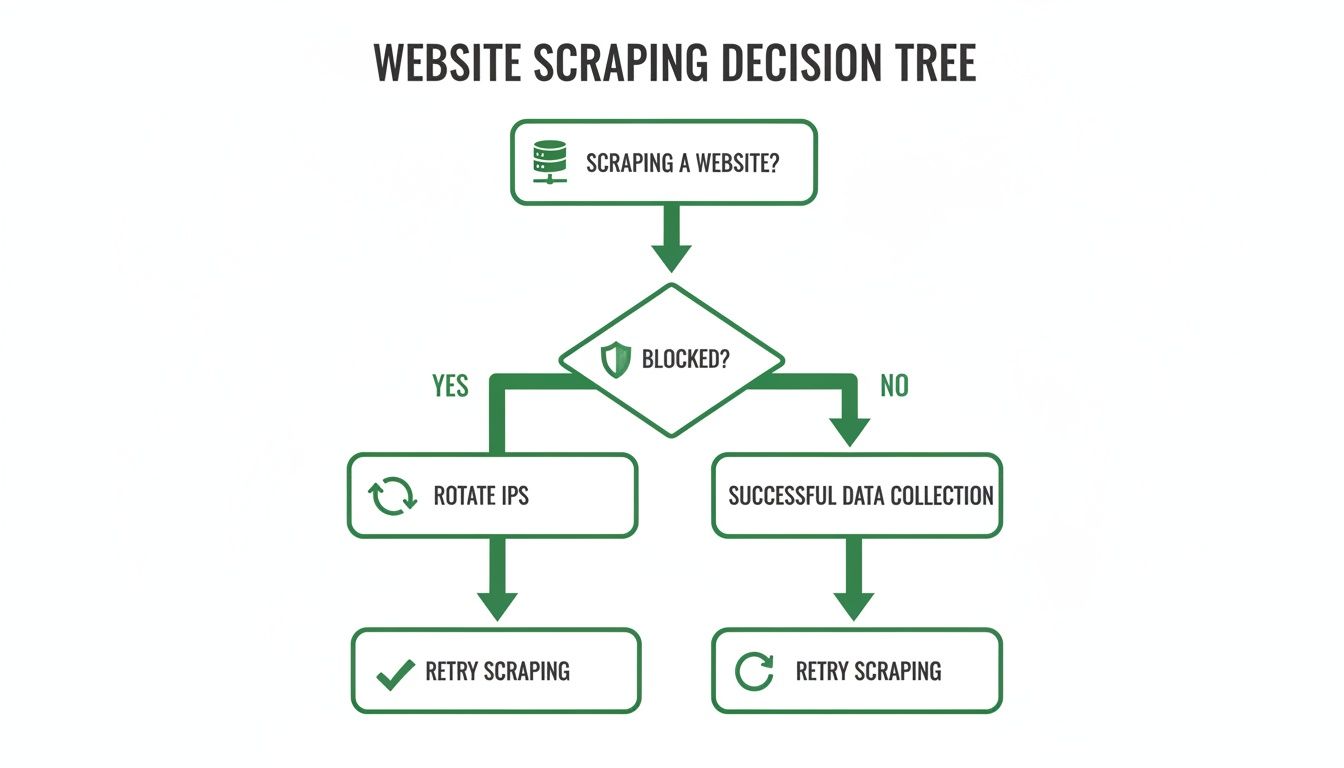
As you can see, when a site starts returning rate-limited responses, IP rotation is the immediate go-to solution. It's the key to keeping your data collection on track.
Choosing Your IP Rotation Strategy
Selecting the right IP rotation pattern is critical for the success of your web scraping project. Each strategy offers a unique balance of request distribution, session consistency, and performance. The following table breaks down the most common patterns to help you decide which one best fits your needs.
| Rotation Pattern | Best For | Pros | Cons |
|---|---|---|---|
| Per-Request Rotation | High-volume, stateless tasks like SERP tracking or scraping large product catalogs. | - Spreads load widely across the IP pool.- Keeps any single IP well within per-IP rate limits.- Ideal for high-volume, independent requests. | - Breaks any multi-step process.- Ineffective for tasks requiring a consistent user session (e.g., logins, checkouts). |
| Sticky Sessions | Multi-step workflows requiring session consistency, such as e-commerce checkouts, account management, or navigating paginated results. | - Maintains a consistent identity for a set duration.- Matches how a real user session behaves.- Essential for stateful interactions. | - Concentrates more requests on one IP.- A single IP can still hit rate limits if it makes too many requests in its session. |
| Session Affinity | Complex scraping tasks that need a persistent identity across multiple requests and domains, like scraping interconnected APIs or platforms. | - Guarantees the same IP is used for a specific target.- Simplifies managing complex stateful interactions.- High reliability for targeted scraping. | - Less flexible than other methods.- Can create a single point of failure if the assigned IP hits a rate limit. |
| Geo-Targeted Rotation | Scraping localized content, such as flight prices, local search results, or region-specific product availability. | - Accesses content tailored to a specific country, state, or city.- Enables accurate collection of geo-specific data.- Returns the correct regional content. | - Can be more expensive.- Pool size for a specific location might be limited, raising the risk of rate limits if not managed well. |
By comparing these strategies against your project requirements, you can build a more resilient and efficient scraper. Remember to consider the target site's rate limits and the nature of the data you're collecting.
High-Frequency Per-Request Rotation
Let's start with the most common high-volume strategy: per-request rotation. It does exactly what it says on the tin. Every single request you send goes through a brand-new IP address. This pattern is the go-to for high-volume, stateless data collection.
Picture this: you're scraping thousands of keywords from Google or pulling product details from a massive e-commerce site. Each request is a self-contained task; it doesn't need to remember what the last one did.
-
Ideal Use Cases:
- SERP Tracking: Gathering ranking data where each keyword query is an isolated event.
- Large-Scale Product Scraping: Pulling price, stock, and other details from thousands of individual product pages.
- API Data Aggregation: Making tons of independent calls to a public API with tight rate limits.
Because no single IP makes more than a request or two, this approach keeps each address comfortably within per-IP rate limits, which means fewer failed requests across a large job.
Maintaining State with Sticky Sessions
Of course, per-request rotation has one massive flaw: it shatters any process that needs a consistent user session. If your IP changes with every click, the website treats you like a new visitor every single time. That's where sticky sessions save the day.
A sticky session assigns a single proxy IP to you for a specific amount of time or until you choose to end it. This lets you perform multi-step actions that demand a consistent identity, just like a real person browsing a website.
A classic example is working through an e-commerce checkout. You need the same IP to log in, add something to your cart, fill out shipping info, and finalize the purchase. If your IP swapped midway, the server would almost certainly kill your session and dump your cart.
This method is absolutely essential for tasks like:
-
Managing social media accounts.
-
Clicking through paginated search results.
-
Completing any kind of multi-page form or workflow.
Most proxy providers let you set the "stickiness" from a few seconds up to 30 minutes or longer. For anyone building complex scrapers, knowing how to manage these sessions is a core skill. You can dive into the technical details in our API documentation on sessions.
Geo-Targeted Rotation for Localized Content
Another incredibly important pattern is geo-targeted rotation. This strategy is all about using a pool of proxies that come exclusively from a specific country, state, or even city. The whole point is to access content that changes based on a user's location.
For instance, a travel aggregator needs to scrape flight prices from different countries. The price for a flight from New York to London often looks different on the airline's US site compared to its UK site. By rotating through proxies based in both the US and the UK, the scraper can grab both sets of localized data accurately.
The scale of modern proxy networks is what makes this so powerful. In just a few years, leading residential and mobile proxy providers have expanded to offer tens or even hundreds of millions of rotating IPs across nearly every country imaginable. One 2026 comparison points to a single provider with around 191 million IPs, all capable of automatic per-request rotation or sticky sessions up to 60 minutes. When tuned correctly, these large pools consistently deliver success rates above 99.9% on major sites.
At the end of the day, picking the right pattern is a balancing act. You have to weigh request distribution, session consistency, and localized access against the project's complexity and budget. By understanding these core strategies, you'll be well on your way to building more reliable and resilient web scrapers.
Putting Theory Into Practice With Code
It’s one thing to talk about proxy IP rotation patterns, but it’s another to see them in action. Let's shift from theory to actual code and walk through how to bring these strategies to life. We'll look at two very different approaches to see how you can go from a basic, manual setup to a much more powerful, managed solution.
We'll start with a straightforward Python example. This will give you a solid feel for the mechanics before we jump into a production-ready alternative that does all the heavy lifting for you.
Manual Rotation With Python Requests
If you're just starting out, building a simple rotator yourself is a great way to wrap your head around the core concepts. The idea is to create a list of proxy IPs and then cycle through them for each request. It's a fantastic learning exercise, but I wouldn't recommend it for any serious project because it's pretty fragile.
Let's say you have a small list of proxies. You can use Python's popular requests library to send your web traffic through them one by one. The logic is simple: grab the next proxy in your list for each new request you make.
Here’s what a basic round-robin setup looks like in Python:
import requests import itertools
A simple list of proxy IPs you've acquired
proxy_list = [ 'http://user:pass@proxy1.com:port', 'http://user:pass@proxy2.com:port', 'http://user:pass@proxy3.com:port', ]
Create an iterator that cycles through the list indefinitely
proxy_cycler = itertools.cycle(proxy_list)
The URL you want to scrape
target_url = 'https://api.example.com/data'
for i in range(10): # Let's make 10 requests
Get the next proxy from the cycler
current_proxy = next(proxy_cycler) proxies = { 'http': current_proxy, 'https': current_proxy, }
try:
    print(f"Request {i+1}: Using proxy {current_proxy}")
    response = requests.get(target_url, proxies=proxies, timeout=5)
    # Process your response here...
    print(f"Success! Status code: {response.status_code}")
except requests.exceptions.RequestException as e:
    # Basic error handling for a failed proxy
    print(f"Failed to connect with proxy {current_proxy}. Error: {e}")
This script gets the job done, but you'll hit its limits fast. You're on the hook for sourcing the proxy list, managing it, handling connection failures, and reacting to rate limits. It's a decent starting point, but it just doesn't scale well.
A Smarter Way With A Proxy Rotation Service
Let's be honest: manually managing a proxy list is a headache, especially for any real-world data collection job. A much better approach is to use a dedicated service like Scrappey, which takes care of all the complex proxy IP rotation logic behind a single API endpoint.
Instead of messing with your own list, you just send your request to the service's API. It automatically assigns a fresh, high-quality residential or datacenter IP from its huge pool for you. All that complexity just vanishes.
The diagram below shows just how much simpler this makes things. Your scraper hits one endpoint, and the service handles all the proxy selection and rotation automatically.
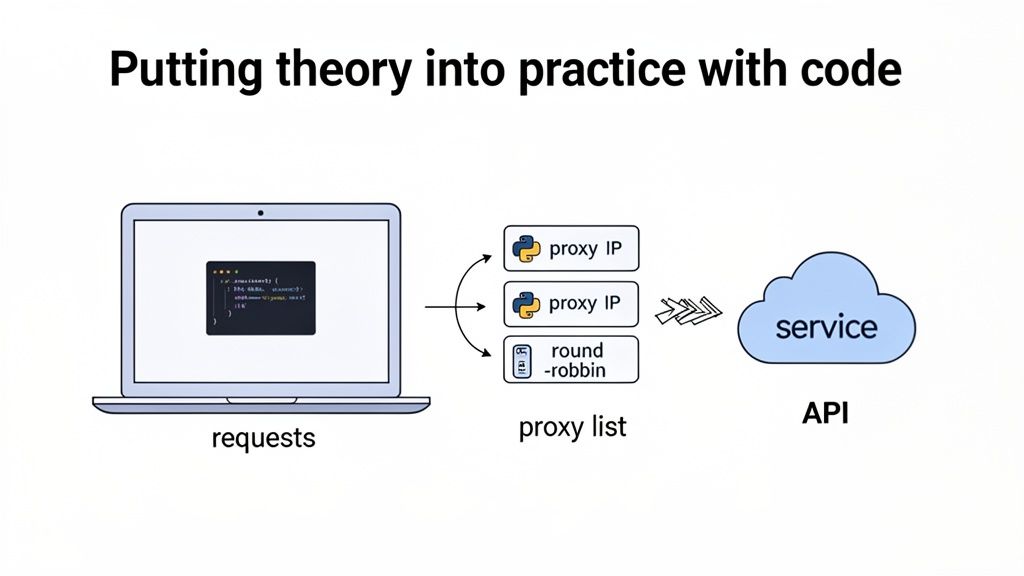
This model frees you up to focus on what actually matters—getting the data—instead of getting bogged down in proxy infrastructure. The service deals with IP health, geo-targeting, and session management behind the scenes.
Using a managed service in Python couldn't be easier. Here’s how you’d make a request through Scrappey:
import requests
Your Scrappey API key
API_KEY = 'YOUR_API_KEY'
The target URL you want to scrape
target_url = 'https://www.example.com'
Construct the API request payload
payload = { 'cmd': 'request.get', 'url': target_url }
Send the request to the Scrappey API endpoint (API key goes in the query string)
response = requests.post(f'https://publisher.scrappey.com/api/v1?key={API_KEY}', json=payload)
The response contains the HTML from the target URL
print(response.text)
With this approach, every call to the API endpoint can use a different IP, achieving perfect per-request rotation without any manual effort. You get the benefits of a massive, healthy proxy pool without the maintenance headache. For those working with dynamic websites, you can find helpful tips in our guide on scraping JavaScript-heavy sites.
Integrating Into The Scrapy Framework
For larger, more complex scraping projects, many of us rely on frameworks like Scrapy. Plugging a managed proxy IP rotation service into Scrapy is a common and incredibly effective pattern. The best way to do this is by creating a custom middleware.
A Scrapy middleware acts like a gatekeeper, intercepting every request your spider makes. This gives you a chance to modify it before it goes out. Here, we'll build a middleware that routes all outgoing requests through the Scrappey API.
Here’s a practical example of what that Scrappey middleware looks like:
in middlewares.py
import json
class ScrappeyMiddleware: def init(self, api_key): self.api_key = api_key
@classmethod
def from_crawler(cls, crawler):
    return cls(api_key=crawler.settings.get('SCRAPPEY_API_KEY'))

def process_request(self, request, spider):
    # The URL we want to send to Scrappey
    target_url = request.url

    # Scrappey endpoint with the API key in the query string
    proxy_url = 'https://publisher.scrappey.com/api/v1?key=' + self.api_key

    # Scrappey expects a POST with a JSON body
    body = json.dumps({'cmd': 'request.get', 'url': target_url})

    # Route the original request through Scrappey
    return request.replace(
        url=proxy_url,
        method='POST',
        body=body,
        headers={'Content-Type': 'application/json'},
    )
To get this working, all you have to do is drop your API key into settings.py and enable the middleware. Just like that, every spider in your project gets reliable IP rotation, letting you scale your scraping while staying within rate limits and keeping failed requests low.
How to Monitor and Troubleshoot Your Proxy Rotation
Getting a proxy rotation strategy in place is a big win, but the job's not over. This isn't a "set it and forget it" kind of task. Think of it more like keeping a high-performance engine tuned—you have to keep an eye on the gauges to make sure everything is running smoothly. Without monitoring, you're flying blind, unaware of silent failures, a creeping rate of failed requests, or a small change on the target site that just dropped your success rate.
You wouldn't just turn on a complex machine and hope for the best, right? You’d be watching the oil pressure, temperature, and RPMs to catch problems before they cause a total breakdown. The same logic applies here. A solid monitoring setup and a clear troubleshooting plan are what separate amateur scrapers from professional, scalable data operations.
Key Metrics to Watch Like a Hawk
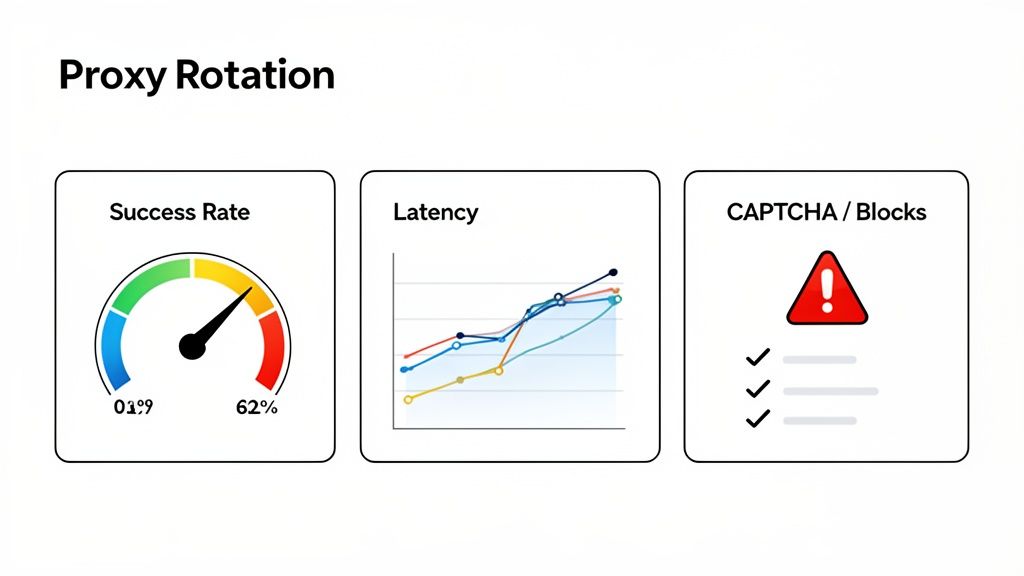
To get a real pulse on your rotation's health, there are a few essential metrics you need to track obsessively. These data points are your early warning system, telling you exactly when and where things are starting to go sideways. For any serious project, logging these for every single request is non-negotiable.
-
Success Rate (2xx vs. 4xx/5xx): This is your north star metric. A high percentage of 2xx status codes (like 200 OK) means things are healthy. A sudden spike in 4xx codes (like 403 Forbidden or 429 Too Many Requests) or 5xx server errors is a clear warning sign. It usually means you're hitting rate limits or your proxy pool is unhealthy.
-
Request Latency: How long is it taking to get a response? Some fluctuation is perfectly normal, but if you see your average latency creeping up, it could point to a problem with your proxy provider. It might also mean a specific geographic pool of your proxies is underperforming or being throttled.
-
Failed-Request and CAPTCHA Counts: Are you seeing more CAPTCHA pages or "Access Denied" responses in the HTML you get back? These indicate that the site's bot detection systems are stepping in, often because of request volume or pacing. Count them specifically, because they often come back with a 200 OK status code, which can make your success rate look better than it actually is.
Diagnosing a Sudden Drop in Success
Okay, let's play out a common scenario. Your scraper has been humming along at a 98% success rate, and then, out of nowhere, it plummets to 40%. Panic mode. Is it your code? The proxies? The target site itself? Having a diagnostic checklist ready helps you systematically find the root cause without pulling your hair out.
Here’s a practical flow to follow:
-
Check the Target Site Manually: First thing's first—open the website in a normal browser. Is it down for maintenance? Did the layout completely change? Sometimes the simplest explanation is the right one.
-
Analyze the Failure Type: Dig into the logs. What are the most common error codes? A flood of 403s usually points to a permission or IP-reputation issue. Getting swamped with 429s means you're being rate-limited and need to slow down.
-
Isolate the Proxy Pool: If you're using proxies from different countries or providers, test them in isolation. Is one particular region showing a much higher failure rate? The target site might restrict traffic from that location, or your provider's IPs in that area might have a lower reputation score.
An often-overlooked aspect is the sheer scale of modern proxy networks. A 2024 analysis estimated the global proxy server market at $2.51 billion, with providers operating millions of IPs that handle over 1.2 billion rotated sessions daily for tasks like e-commerce tracking. This scale means a single project can easily burn through tens of thousands of IPs, making automated monitoring not just a best practice but a necessity. You can find more details in this proxy server market report.
Building a More Resilient Scraper
Once you can spot problems, the real magic is building systems that handle them automatically. This is where intelligent error handling turns your scraper into something far more robust and less likely to fall over at the first sign of trouble.
A critical technique here is exponential backoff. When your scraper hits a temporary error like a 429 (Too Many Requests) or a 503 (Service Unavailable), don't immediately retry. Instead, wait for a short period—say, 2 seconds—then try again. If it fails a second time, double the wait to 4 seconds, then 8, and so on, up to a reasonable cap. This "backing off" gives the server room to recover and keeps your request rate within the site's limits.
By combining diligent monitoring with automated, intelligent retry logic, you turn your scraper from a fragile script into a resilient data-gathering system that adapts to changing conditions and runs reliably at scale.
Avoiding Common Pitfalls and Scraping Ethically
Getting a solid proxy IP rotation system up and running is a big technical win, but it's not the finish line. Even technically sound scrapers run into trouble because of simple, avoidable mistakes. The code is only half the battle; the other half is being mindful of how, when, and what you scrape.
Acting like a good citizen of the web keeps your IP pool healthy and your pipeline reliable, no matter how large the pool is. It's about building sustainable data pipelines and respecting the systems you're interacting with.
Send Consistent, Well-Formed Requests
One of the most common issues is sending requests that don't resemble normal client behavior. Just rotating IPs isn't enough if every single request looks identical and arrives at a machine-gun pace. Sites apply bot detection systems precisely to this kind of pattern.
A few things that consistent, well-formed automation should get right:
-
Respect robots.txt: This simple text file tells you which parts of a site the owner would prefer not be crawled. Honoring it is good practice and keeps you aligned with the site's expectations. Always check it first.
-
Use Realistic, Varied User-Agents: A real browser sends a User-Agent string to identify itself (like Chrome on Windows, for example). Sending thousands of requests that all share one obscure or outdated User-Agent produces an inconsistent, malformed-looking pattern. Use current, plausible User-Agent values.
-
Add Request Delays: People don't click through 500 pages in 10 seconds. Firing off requests as fast as your server can handle them will trip rate limiters almost instantly. Introduce randomized delays between requests so your traffic stays within the site's limits.
The Geographic Mismatch Problem
Another common error is using proxies from the wrong part of the world. If you're scraping product prices from a UK-based e-commerce site but your requests come from IPs in South America or Asia, you'll often get served inaccurate or irrelevant data, and you may run into more failed requests.
Sites routinely serve different content, pricing, and even layouts based on a visitor's location. Using geo-targeted proxies that match the region of the intended audience is essential for data accuracy. A request from a London IP to a .co.uk domain returns the right regional content; one from halfway across the globe may not.
Key Takeaway: Aim for consistent, well-formed requests. Get the IP's location right, use a current and believable User-Agent, and pace your requests so you stay within the site's rate limits.
A Framework for Responsible Scraping
Building a scraping operation that lasts requires a clear set of principles. Following these best practices doesn't just keep your projects running; it helps maintain the health of the open web for everyone. A great way to approach this is to apply principles from a thorough risk assessment, which helps you spot and handle potential problems before they blow up.
Here’s a quick checklist to keep you on the straight and narrow:
-
Respect Terms of Service: Before you write a single line of code, read the site's Terms of Service (ToS). Many set conditions on automated access. Make sure your project stays within those terms and applicable law, and only collect data you're authorized to access.
-
Scrape During Off-Peak Hours: Be a good neighbor. Think about the load your scraper puts on the target's servers. If you can, schedule your big jobs for late at night or on weekends when human traffic is low. This minimizes your impact and reduces the chance you'll slow down the site for real users.
-
Handle Personal Data with Extreme Care: If your project involves scraping any Personally Identifiable Information (PII), you have to comply with data privacy laws like GDPR or CCPA. This isn't optional. It means having a legal basis for collecting the data, securing it properly, and respecting people's privacy rights.
-
Cache Aggressively: Don't scrape the same page over and over if the data hasn't changed. Caching responses locally dramatically cuts down the number of requests you make, which saves your resources and the target's bandwidth.
-
Identify Your Bot (When Appropriate): This might sound counterintuitive, but in some cases (like academic or research projects), it's good practice to set a custom User-Agent that identifies your scraper and provides a contact method. A little transparency can prevent a lot of misunderstandings.
By pairing powerful proxy IP rotation with these ethical guidelines, you can build scrapers that are not only effective but also responsible and built to last.
Your Top Proxy Rotation Questions, Answered
Even when you've got a solid plan, questions pop up. It happens. Here are some quick answers to the things developers and data engineers usually ask when they start digging into proxy IP rotation.
What's The Real Difference Between Datacenter And Residential Proxies?
It really boils down to their origin and how sites treat them.
Datacenter proxies are exactly what they sound like—IPs that come from servers housed in a data center. They're fast and usually pretty cheap, but there's a catch: their IP ranges are publicly known, so sites often apply tighter limits to them.
Residential proxies are IP addresses that Internet Service Providers (ISPs) assign to real homes. Because they're ordinary consumer IPs, sites tend to treat them like normal traffic, which generally means fewer failed requests. They do tend to be the more expensive option, though.
For sites that enforce strict per-IP limits, residential proxies are often the better choice. Because they're standard consumer IPs, they tend to deliver higher success rates for your scrapers.
Can't I Just Unplug My Router To Rotate IPs?
Technically, restarting your router might get you a new IP from your ISP, but only if you have a dynamic IP address. For any real-world proxy IP rotation scenario, this method is a non-starter. It's painfully slow, knocks your own connection offline, and you only get one new IP at a time, from one single location.
Effective scraping demands a huge, diverse pool of IPs—we're talking hundreds or thousands—from all over the globe that you can switch between instantly and automatically.
So, How Often Should I Be Rotating My IP?
There’s no magic number here. The best rotation frequency is all about your specific target and what you're trying to accomplish.
-
For high-volume, quick-hit tasks, like pulling search engine results, rotating your IP with every single request is your best bet. It spreads load widely and keeps each IP well within rate limits.
-
For anything that involves multiple steps, like navigating a checkout process, you'll want a "sticky" session. This keeps the same IP active for a few minutes to maintain a consistent user session.
A good starting point is to rotate on every request and see how it goes. If you start hitting rate limits or CAPTCHAs, that's a signal to slow your requests down or switch to a sticky session strategy.
Ready to stop managing proxy infrastructure yourself and start collecting the data you're authorized to access? Scrappey handles the complexity of proxy IP rotation for you, all behind a simple API.
Start Scraping for Free with Scrappey