
How to Scrape Web Pages: A Practical Guide to Efficient Scraping
At its heart, web scraping is a pretty simple, three-step dance: you send an HTTP request to a website's server to get its content, parse the HTML code that comes back to find what you're looking for, and then extract that data into a clean, usable format like a CSV or JSON file. Nailing these three actions is the foundation for everything else you'll do, whether you're just collecting a few data points or building a complex market analysis tool.
Your Practical Introduction to Web Scraping
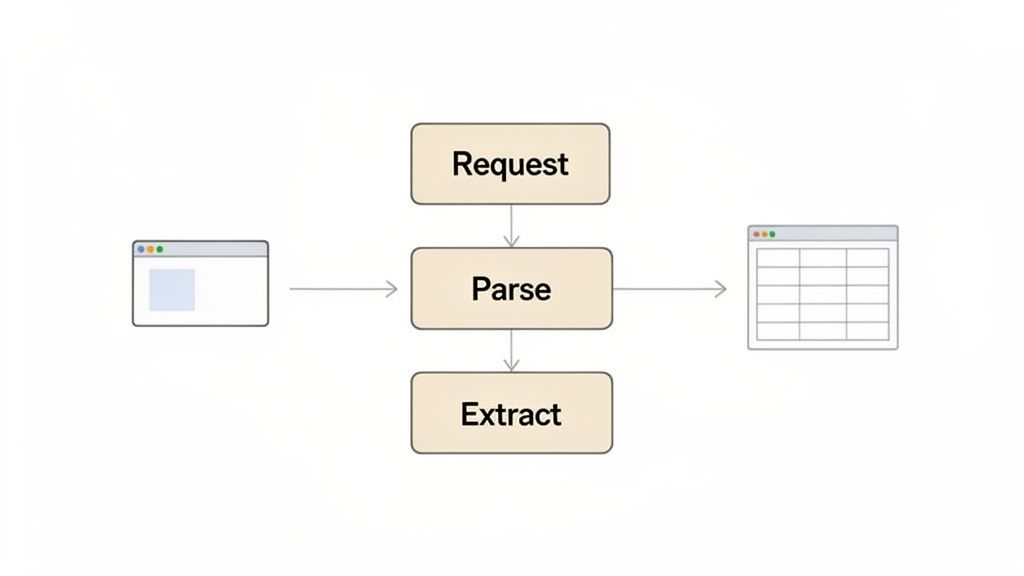
Before we jump into the code, let's build a solid mental model of what’s happening. Think of it like you're ordering from a catalog. First, you request the catalog (the web page). When it arrives, you parse it by flipping through the pages (the HTML) to find the item you want. Finally, you extract the details—like the price and product name—and jot them down.
This simple process is a powerhouse for businesses, allowing them to gather intel for all sorts of strategic moves. They can track competitor pricing in real-time, monitor brand sentiment across social media, or aggregate news articles to spot market trends. It's no surprise the global web scraping market was valued at USD 754.17 million in 2024 and is projected to hit USD 2,870.33 million by 2034. That kind of growth tells you just how critical this capability has become.
Core Web Scraping Concepts at a Glance
To really get the hang of scraping, you need to be comfortable with a few core components. These are the fundamental tools and concepts that turn a messy web page into clean, structured data. The table below breaks them down.
| Component | Role in Scraping | Common Tools |
|---|---|---|
| HTTP Requests | This is how your script asks a server for a web page's content, most often using a GET request. | requests (Python), axios (Node.js), curl |
| HTML Structure | The backbone of a website. Understanding tags like <div> and <p> is key to navigating the page's layout. | Browser Developer Tools ("Inspect Element") |
| CSS Selectors | Patterns that pinpoint specific HTML elements, like grabbing all elements with a class of .product-title. | BeautifulSoup, Scrapy, Puppeteer, Selenium |
Each of these building blocks plays a distinct role in the scraping workflow. Mastering them is your first step toward becoming proficient.
My personal tip for beginners: Spend some serious time with your browser's "Inspect" tool. Just right-click on any element on a page and hit "Inspect." This peels back the curtain and shows you the raw HTML and CSS. It’s the single best way to understand a page's structure before you write a single line of code.
Why Scraping Is More Than Just a Technical Task
While the mechanics are all about programming, the real magic of web scraping is in its strategic application. It gives decision-makers data that would be flat-out impossible to collect by hand. An e-commerce store can automatically adjust its prices based on what competitors are doing, while a financial analyst can pull historical stock data for predictive modeling.
Of course, with great power comes responsibility. It's absolutely crucial to scrape ethically and legally. Always check a website's terms of service and robots.txt file. For a deep dive into staying on the right side of the law, our legal guide to web scraping in 2025 is a must-read.
And if you're curious about different types of scraping applications, exploring how teams collect publicly available business data can offer some useful context on what's possible. By understanding both the technical and ethical sides, you'll be ready to start your scraping journey with confidence.
Scraping Your First Static Web Page
Alright, let's roll up our sleeves and get our hands dirty with some code. We'll kick things off by scraping a static web page. These are the easiest to start with because all the content is delivered in a single HTML file—no tricky JavaScript loading required.
For this job, we'll lean on two heavyweights in the Python scraping world: requests and BeautifulSoup. Think of requests as the tool that fetches the webpage, just like your browser does. Then, BeautifulSoup comes in to make sense of the messy HTML that comes back. They're a classic combo for a reason.
Sending the Initial Request
First things first: you can't scrape what you don't have. The initial step is always to grab the page's HTML content. This is done by sending a simple HTTP GET request to the URL you want to scrape. The server, if all goes well, sends back the raw HTML for us to work with.
Let's pretend we're targeting a simple blog page. The code is refreshingly simple.
import requests
The URL of the static page we want to scrape
url = 'http://example-static-site.com/blog'
Send a GET request to the URL
response = requests.get(url)
Print the status code to confirm a successful request (200 means OK)
print(response.status_code)
Store the HTML content
html_content = response.text A 200 status code is our green light, confirming the request was a success. If you printed html_content right now, you’d see the page's entire HTML source code—a big, unformatted block of text. It's the same thing you get when you right-click a webpage and hit "View Page Source."
Parsing HTML with BeautifulSoup
Now we have the raw HTML, but it's not very useful in its current state. That's where BeautifulSoup works its magic. It takes that jumbled text and transforms it into a structured, searchable object that mirrors the page's underlying structure (the Document Object Model, or DOM).
Creating this "soup" object takes just a single line of code.
from bs4 import BeautifulSoup
Create a BeautifulSoup object to parse the HTML
soup = BeautifulSoup(html_content, 'html.parser') Just like that, we've turned chaos into order. Our soup object is a navigable tree, ready for us to start hunting for the exact data we need.
Finding and Extracting Data with CSS Selectors
To pull out the specific pieces of information we're after, we use CSS selectors. These are patterns that target HTML elements based on their tags, classes, or IDs. This is where your browser's "Inspect" tool becomes your best friend—it helps you figure out the right selectors for the elements you want to grab.
Let's say our target blog page puts all its article titles inside <h2> tags with a class of article-title. We can combine selectors to pinpoint them precisely.
-
Tag Selector: h2 selects all <h2> elements.
-
Class Selector: .article-title selects anything with the class article-title.
-
Combined Selector: h2.article-title selects only the <h2> elements that also have that specific class.
The soup.select() method is what we use to execute this search. It finds every element that matches our selector and returns them in a list. From there, we can loop through the list and extract the clean text from each one.
Use a CSS selector to find all H2 tags with the class 'article-title'
article_titles = soup.select('h2.article-title')
Loop through the found elements and print their text
for title in article_titles: print(title.get_text(strip=True))
A Quick Win: In just a handful of lines, you've gone from a simple URL to a clean list of extracted article titles. This fundamental process—request, parse, extract—is the bread and butter of almost every web scraping project. Get this down, and you're ready for more complex challenges.
By mastering the combination of requests and BeautifulSoup, you build a solid foundation for scraping web pages. These skills are exactly what you'll need as we move on to tackling dynamic, JavaScript-heavy sites.
Handling Dynamic Websites And Anti-Scraping Blocks
The simple request-and-parse method works beautifully for static sites, but you'll quickly hit a wall with modern web applications. Lots of sites today use JavaScript to fetch and display content after the initial page loads. This means the product prices, user reviews, or flight data you’re after might not even exist in the raw HTML your first request gets.
This is a classic "gotcha" moment for anyone new to scraping. You inspect the page in your browser, see the data clear as day, but your script comes back with nothing. What gives? Your browser runs all the necessary JavaScript to render the full page, while a basic HTTP library just grabs the initial, often skeletal, HTML document.
To get around this, we need a tool that can act more like a real browser. This is where headless browsers come in.
Rendering JavaScript With Headless Browsers
A headless browser is just a web browser without a graphical user interface. Tools like Selenium or Puppeteer can programmatically control a real browser engine (like Chrome or Firefox) to load a page, execute its JavaScript, and wait for all that dynamic content to appear. This way, your script sees the fully rendered page, just like a human would.
The trade-off, of course, is performance. Firing up and controlling a full browser instance is way slower and more resource-heavy than sending a simple HTTP request. But for JavaScript-heavy sites, it's often the only reliable way to get the data you need.
The decision tree below maps out the standard process for scraping a basic static page. This is the foundation you build on before tackling more complex, dynamic sites.
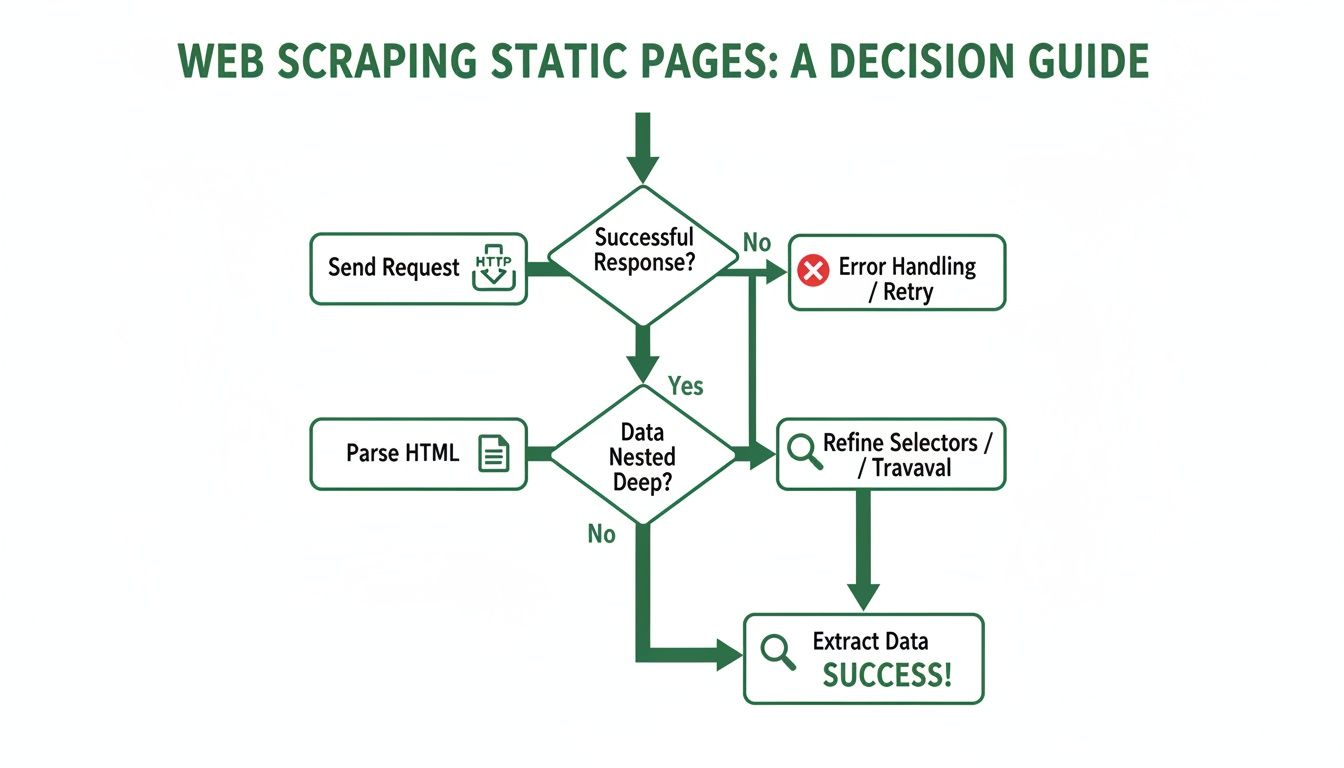
This graphic nails the workflow for static content, but once JavaScript enters the picture, you have to add an entire rendering step before parsing can even begin.
Navigating Common Anti-Scraping Defenses
Successfully rendering a dynamic page is just one piece of the puzzle. Websites actively try to detect and shut down automated scrapers. The moment you start scraping at any real scale, you're going to run into these defenses. Knowing what they are is the first step to getting past them.
Some of the usual suspects include:
-
IP Rate Limiting: A website tracks how many requests come from a single IP address. If you send too many too quickly, your IP gets blocked—either for a little while or for good.
-
User-Agent Blocking: Every HTTP request includes a User-Agent header that identifies what's making the request (e.g., "Python/requests"). Obvious bot-like User-Agents are an easy target for blocks.
-
CAPTCHAs: These annoying tests are designed specifically to stop bots by presenting a puzzle that’s simple for a human but tough for a script to solve.
-
Honeypot Traps: Sneaky developers might place invisible links on a page that only a scraper would follow. Click one, and your IP is instantly flagged as a bot.
This brings us to a key comparison. Building and maintaining all this infrastructure yourself is a massive headache. The alternative? Using a dedicated API that handles it all for you.
Manual Scraping vs Using a Scraping API
Here’s a quick breakdown of how a DIY approach stacks up against using a service like Scrappey when facing common scraping hurdles.
| Challenge | Manual In-House Approach | Using an API like Scrappey |
|---|---|---|
| IP Blocks & Rate Limits | Requires purchasing and managing a large, diverse pool of residential or datacenter proxies. You're responsible for rotation logic. | Handled automatically. The API distributes requests across a massive, globally distributed proxy network, spreading load so authorized workflows stay reliable. |
| JavaScript Rendering | You need to set up and maintain your own fleet of headless browsers (e.g., Selenium Grid), which is resource-intensive and complex. | Simply enable a parameter (e.g., browser=true). The API manages the headless browser infrastructure on its end, returning the fully rendered HTML. |
| CAPTCHAs | A challenge is a signal to slow down; you have to build in backoff, gentler pacing, and human review yourself. | The API reduces failed requests on well-formed, authorized workflows by keeping requests clean and consistent, so challenges stay rare in the first place. |
| Browser Fingerprinting | You must constantly update browser headers, screen resolutions, and other configuration data to keep a consistent, realistic browser profile. | Managed for you. The API uses real, up-to-date browser configurations, which improves reliability and reduces blocked requests on authorized workflows. |
| Maintenance & Scaling | It becomes a full-time job. Bot detection systems change constantly, so you're always playing a cat-and-mouse game to keep your scrapers running. | The API provider's entire business is staying ahead of bot detection tech. You focus on data, they handle the access. |
As you can see, while a manual approach gives you total control, it also saddles you with the immense operational burden of running a complex, 24/7 anti-blocking operation. An API offloads all that complexity.
Practical Strategies to Reduce Blocks
To make your scraper more reliable on authorized workflows, you need to match a real browser profile and behave like a well-configured client. This isn't about one single trick; it's a layered strategy to send consistent, legitimate-looking requests.
The single most effective strategy is using a rotating proxy service. These services route your requests through a huge pool of different IP addresses, so from the website's perspective, the requests are distributed across many sources rather than hammering from one. This immediately solves the IP rate-limiting problem.
On top of that, you should always rotate your User-Agent headers. Instead of sending the default requests header every single time, cycle through a list of common browser User-Agents for Chrome, Firefox, and Safari on various operating systems. This keeps your requests consistent with real-world browsers and improves reliability.
When a CAPTCHA does appear, treat it as the site asking you to confirm a real, authorized person is involved—and respect that signal. The right response is to slow down, reduce concurrency, back off and retry later at a gentler pace, or route the request to human review. For an ongoing need, request official or partner API access instead. The cheapest CAPTCHA is the one you never trigger: clean, consistent, well-paced requests keep challenges rare. For more context, check out our guide on handling CAPTCHAs responsibly with scraping APIs and proxies.
Combining these techniques—headless browsers, proxy rotation, and consistent header configuration—is the bare minimum for reliably scraping modern websites on authorized workflows. But managing this infrastructure yourself is a serious engineering challenge, which is exactly why a robust API solution is often the smarter, more practical choice.
Scaling Your Scraping with a Dedicated API
When your data needs start climbing past a few hundred pages, you quickly learn that managing your own scraping infrastructure is a full-time job. You're no longer just pulling data; you're suddenly a sysadmin, a network engineer, and an bot detection strategist, all rolled into one. This is exactly when a dedicated scraping API becomes a total game-changer.
Instead of building, maintaining, and constantly fighting with a complex stack of proxies and headless browsers, you can offload the entire messy process. A service like Scrappey handles all the gritty mechanics of just getting to a web page, letting you focus purely on the data itself.
The whole idea is beautifully simple: you make a single, clean API call. The service takes care of the hard parts—rotating IPs, rendering JavaScript, and retrying failed requests—behind the scenes.
Simplify Your Workflow with a Single API Call
Let's say you need to scrape product details from an e-commerce site that's geo-restricted, showing different content to users in Germany. Doing this on your own means finding reliable German residential proxies and making sure your headless browser is perfectly configured to use them. It's a fragile and time-consuming setup.
With a dedicated API, this process is dramatically simpler. You just add a single parameter to your request.
-
Geo-Targeting: Specify country_code=DE to make your request look like it's coming from Germany.
-
JavaScript Rendering: Add browser=true to have the API render the page in a real browser before sending back the final HTML.
-
Session Management: Use a session_id to keep a consistent IP and cookie state across multiple requests, which is crucial for scraping sites that require a login.
This approach abstracts away the most frustrating parts of web scraping. You're not wrestling with infrastructure anymore; you're just telling the API what you need, and it delivers the clean HTML for you to parse.
The real value of a scraping API is the time it gives back to you. Every hour you're not debugging a broken proxy or a failed Selenium script is an hour you can spend analyzing the data you've collected and deriving actual business insights from it.
Managing Concurrency and Scale Effortlessly
One of the biggest hurdles in scaling any scraping operation is managing hundreds or thousands of concurrent requests without overloading a single IP and triggering rate limits. This is where a good API provider shines, with its massive, globally distributed proxy network built for exactly this purpose.
When you send 1,000 concurrent requests through an API like Scrappey, it doesn't just hammer the target website from a single server. It intelligently spreads those requests across a huge pool of IPs, distributing load so each source stays within reasonable limits on authorized workflows.
This screenshot shows the kind of clean, user-friendly interface a scraping API offers, hiding all the complex backend work from you.
The dashboard makes task management simple, allowing you to monitor usage and configure requests without needing deep technical overhead. This shift in focus from infrastructure to data is a massive efficiency win for developers and analysts alike.
Advanced Features for Complex Scenarios
Beyond just getting basic access, modern scraping APIs come packed with powerful features to solve specific, tricky problems. For instance, scraping a site that demands a multi-step flow can be a total nightmare to automate on your own.
Services like Scrappey offer sticky sessions, which tie all requests with a specific session ID to the same outgoing proxy. This makes sure the target server sees a consistent user, allowing you to navigate through multi-step forms, add items to a cart, and complete multi-page flows reliably. If you're curious about the mechanics, check out this guide on building a web scraping API to see what's under the hood.
The market for these tools is exploding for a reason. The web scraping software market size is projected to jump from USD 782.5 million in 2025 to USD 2.7 billion by 2035. This rapid growth shows just how many organizations are realizing the value of automating data collection at scale. You can read more about the growth in the web scraping software market to see where the industry is headed.
Ultimately, using a dedicated API is a strategic decision about where you invest your time and resources. By letting the specialists handle the complex and ever-changing world of bot detection countermeasures, you free yourself up to do what really matters: turning raw web data into valuable information.
How to Structure and Store Your Scraped Data
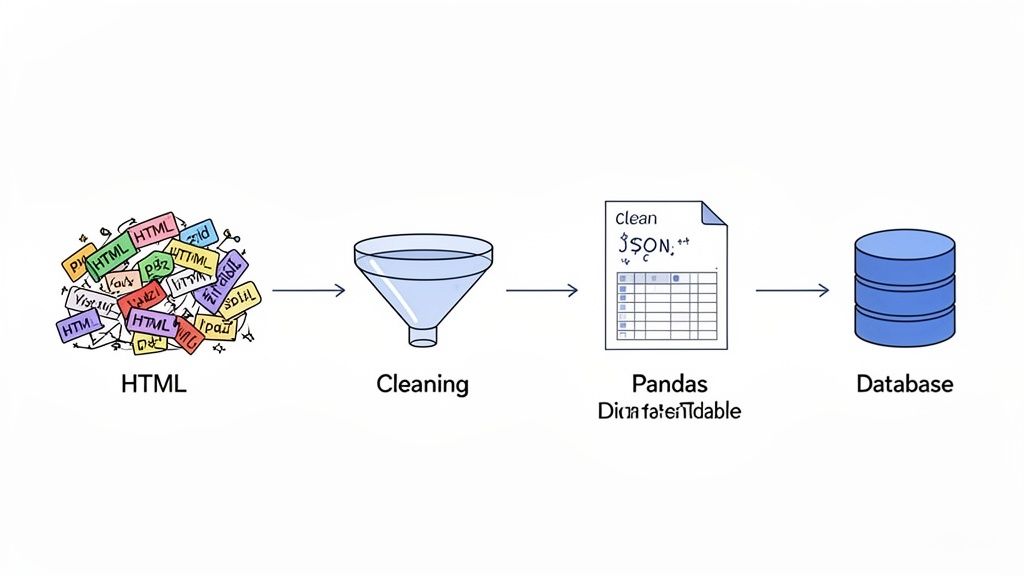
Pulling raw data from a website is a huge win, but let's be honest—it's only half the battle. Raw HTML is a chaotic mess, totally useless for any real analysis. The next move is where the magic happens: cleaning, structuring, and storing that information so it's clean, reliable, and ready for action.
This whole process is often just called parsing. Think of it as taking a giant, unsorted pile of mail and neatly stacking it into bills, letters, and junk. It’s the step that transforms web chaos into clean, predictable data. If you want to go deeper, this guide on understanding data parsing is a great place to start.
Ultimately, you want to build a data pipeline you can trust. One that delivers accurate and consistent information every single time you run your scraper.
Choosing Your Data Format
First thing's first: you need to decide what structure to put your clean data into. The right choice really just depends on what you plan to do with it. Two formats stand out for their flexibility and are pretty much the standard in data projects.
-
JSON (JavaScript Object Notation): This is a lightweight, human-readable format that’s perfect for nested or hierarchical data. If you’re scraping product listings where each item has multiple attributes like reviews, sizes, and colors, JSON is a natural fit. It’s also the go-to for most web APIs.
-
Pandas DataFrame: For anyone working in Python, organizing data into a DataFrame is almost always the most practical step. It gives you a powerful, table-like structure that’s ideal for cleaning, analyzing, and visualizing your data later on.
For example, scraping a list of books with columns for Title, Author, and Price is a perfect use case for a DataFrame. But if you were scraping user profiles, each with a list of posts and comments, a nested JSON structure would make a lot more sense.
From Simple Files to Robust Databases
Once your data is structured, it needs a home. The storage solution you pick should match the scale and complexity of your project. My advice? Don't over-engineer it. A simple CSV can be perfect for a one-off analysis, but a dataset that’s going to grow over time needs something more robust.
For quick, small-scale tasks, a CSV or JSON file is more than enough. But for any long-term, evolving project, a proper database is non-negotiable.
Key Takeaway: Start with the simplest storage method that gets the job done. You can always migrate to a more complex system later as your project grows, but starting with an overly complicated database will just slow you down.
Here’s a quick comparison to help you figure out what’s best for your needs.
| Storage Option | Best For | Pros | Cons |
|---|---|---|---|
| CSV File | Quick analysis, small datasets, sharing data | Simple, universally compatible, easy to read | Not efficient for large data, lacks data typing |
| JSON File | Hierarchical data, API outputs, web app data | Flexible structure, human-readable, good for nested data | Can be inefficient to query, larger file sizes |
| SQL Database | Structured, relational data, long-term projects | Powerful querying, data integrity, scalable | Requires schema design, more complex setup |
| NoSQL Database | Unstructured or semi-structured data, high-volume scraping | Flexible schema, scales horizontally, fast writes | Querying can be less flexible than SQL |
Making Your Data Pipeline Reliable
A great data pipeline does more than just move information around—it ensures the data is clean and consistent. This means building in logic to handle common headaches like missing values, inconsistent formatting (like "USA" vs. "United States"), and incorrect data types.
By building validation rules and cleaning steps directly into your script, you guarantee that the final data you store is trustworthy. This proactive approach saves you countless hours of manual cleanup down the road and makes your entire project far more valuable.
Common Web Scraping Questions Answered
As you start scraping web pages, you're bound to run into a few head-scratchers. Everyone does. From the murky legal waters to the technical walls websites throw up, getting straight answers is key. This section cuts through the noise to tackle the questions we see pop up most often.
Think of this as your quick-start FAQ, built from years of real-world scraping experience.
Is It Legal to Scrape Web Pages?
This is the big one, and for good reason. Web scraping lives in a legal gray area, but the general consensus really boils down to what you're scraping and how you're doing it. If the data is publicly available and not hidden behind a login or protected by copyright, you're generally on solid ground.
But it's not a free-for-all. You have to be a good neighbor and respect the website's infrastructure and rules. That means:
-
Check the robots.txt file: This is the site's welcome mat for bots. It tells you which areas are off-limits. Honor it.
-
Glance at the Terms of Service: Many sites explicitly forbid automated data collection.
-
Steer clear of personal data: Scraping personal info can land you in hot water with privacy laws like GDPR and CCPA.
The golden rule? Don't be a jerk. Be a good internet citizen. Avoid hammering a server with aggressive, rapid-fire requests. Always identify your scraper with a clear User-Agent string so the site admins know who you are. If you're building a commercial-scale project, getting a quick consultation with legal counsel is the smartest money you'll ever spend.
How Do I Handle Websites That Block My IP Address?
Sooner or later, you'll hit the dreaded IP block. It's the most common defense mechanism out there. A website sees a flood of requests coming from your single IP address in a short amount of time, flags you as a bot, and slams the door shut. Simple, but incredibly effective.
The most reliable way around this is using a rotating proxy service. These services act as intermediaries that funnel your requests through a massive pool of different IP addresses. To the target website, requests are distributed across many sources around the world rather than concentrated on one, which keeps authorized workflows from tripping simple IP rate limits.
What Is the Difference Between Scraping and a Web Crawler?
People often use "scraping" and "crawling" interchangeably, but they're actually two different jobs. A web crawler, or spider, is what search engines like Google use. Its main goal is discovery—it follows link after link to map out and index an entire website, or even the whole internet.
Web scraping, on the other hand, is a precision strike. It’s not about finding new pages; it’s about extracting specific pieces of data from a list of pages you already know about. A crawler might map every single product page on an e-commerce site, but a scraper would visit those specific pages to pull out just the product names, prices, and stock levels.
How Can I Scrape Data That Requires a Login?
Data behind a login generally isn't public, and using automation to reach it often conflicts with a site's terms of service and can carry legal risk. Rather than scripting a login flow, the responsible path is to use the site's official API or an authorized data-access arrangement. Keep your scraping focused on publicly available pages you have permission to collect.
Manually juggling these cookies and handling things like session timeouts can get complicated fast. This is where a powerful scraping API can be a lifesaver, as it often handles all the authentication and cookie management for you.
Ready to stop worrying about IP blocks, proxy rotation, and JavaScript rendering? Scrappey handles all the complex infrastructure for you, turning any website into a simple API call. Start extracting the data you need today, not tomorrow. Get started with Scrappey and scale your data collection effortlessly.