
A Practical Guide to Mastering Java Web Scraping
The entire game of Java web scraping really comes down to one crucial decision: picking the right tool for the job.
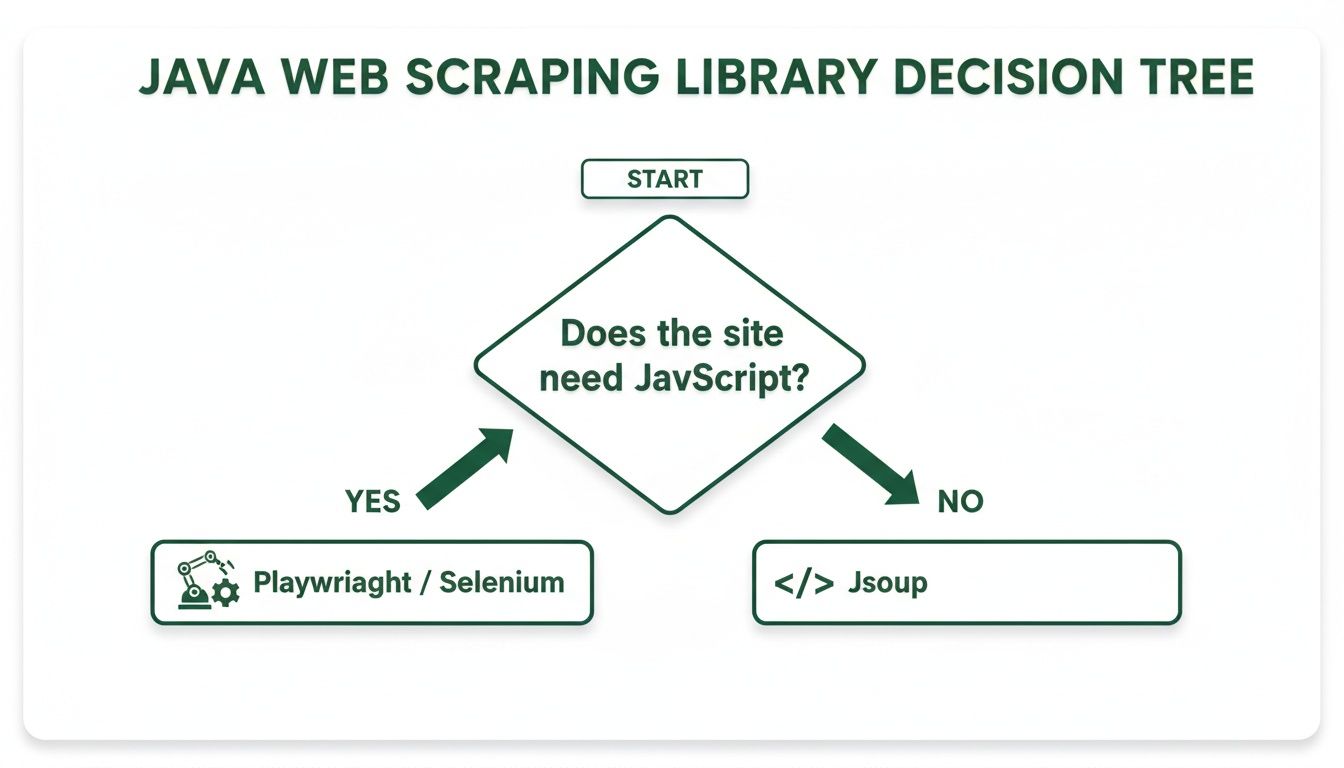
Your choice between a simple HTML parser like Jsoup and a full browser automation tool like Selenium or Playwright will pretty much define your project's speed, complexity, and whether it succeeds or fails. It's the difference between easily scraping static content and being able to tackle modern, JavaScript-heavy websites.
Choosing the Right Java Library for Your Project
Picking the best library isn't about grabbing the most powerful one off the shelf. It’s about matching the tool to the website you’re targeting. A mismatch here leads to dead ends and frustrating rewrites. The first question you have to answer is simple: how does the content I need actually get onto the page?
Jsoup: The Lightweight HTML Parser
Jsoup is a pure Java library built to do one thing exceptionally well: parse HTML. It's a surgical tool for dissecting a webpage that arrives fully formed from the server.
It’s blazing fast and has a tiny memory footprint. This makes it the perfect choice for high-volume scraping on simple sites like blogs, forums, or basic e-commerce listings where all the juicy data is right there in the initial HTML source code.
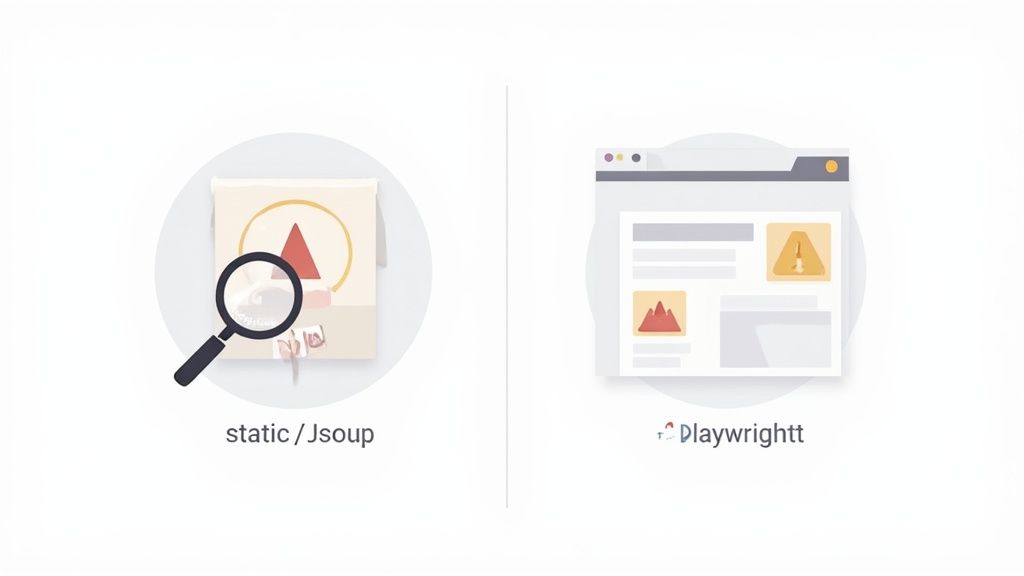
The big catch? Jsoup cannot execute JavaScript. If a website uses a framework like React, Angular, or Vue.js to dynamically load data after the page first appears, Jsoup will only see the empty shell—not the final content you're actually after.
Selenium and Playwright: Browser Automation Powerhouses
When you run into a dynamic, JavaScript-driven website, you need a tool that can behave like a real person using a browser. That’s where browser automation libraries like Selenium and Playwright shine. They take control of a real web browser (like Chrome or Firefox), often in a "headless" mode without a GUI.
Because they render the entire page, execute all the scripts, and can even simulate clicks and scrolls, they can scrape pretty much any modern website you throw at them. This power is non-negotiable for tackling:
-
Single-Page Applications (SPAs) where content changes on the fly.
-
Infinite-scroll pages that load more items as you go.
-
Data hidden behind login forms or interactive dashboards.
-
Content loaded via AJAX/Fetch calls after the initial page load.
The trade-off is performance. Firing up and controlling a full browser is way slower and more resource-hungry than a simple Jsoup request. They're overkill for scraping millions of simple pages but absolutely essential for the complex ones. To get a better handle on how they stack up, check out our comprehensive comparison of Playwright and Selenium.
Before you write a single line of code, you need to decide which approach is right for your project. The table below breaks down the key differences to help you make the right call.
Java Web Scraping Library Comparison
| Library | Best For | Handles JavaScript? | Key Advantage |
|---|---|---|---|
| Jsoup | Static HTML pages, high-volume scraping of simple sites. | No | Incredibly fast and lightweight with a minimal memory footprint. |
| Selenium | Dynamic websites, SPAs, simulating complex user interactions. | Yes | Mature, extensive community support, and cross-browser compatibility. |
| Playwright | Modern web apps, SPAs, capturing network traffic and events. | Yes | Faster and more reliable than Selenium with a modern API. |
Ultimately, the choice between these libraries will shape your entire scraping architecture, so it pays to get it right from the start.
My Pro Tip: Always start by checking the target website. Right-click and hit "View Page Source" in your browser. If the data you want is visible right there in the raw HTML, Jsoup is your friend. If it's not, you'll need the heavy-lifting power of Selenium or Playwright.
Configuring Your Java Scraping Environment
Before you even think about writing your first line of Java web scraping code, you need to set up a solid development environment. Trust me, getting this right from the start saves a ton of headaches later, especially when you start juggling different libraries and their versions. This is where build automation tools are your best friend.
For any serious project, using a tool like Maven or Gradle isn't just a suggestion—it's essential. Think of them as a project manager that automatically downloads the libraries you need (like Jsoup or Selenium) and sorts out any version conflicts. This means you can focus on the fun part—building your scraper—instead of hunting down missing JAR files.

Managing Dependencies with Maven and Gradle
So, Maven or Gradle? The choice often boils down to what you or your team prefers. Maven uses XML for its configuration files, which is a bit wordy but very structured and explicit. Gradle, on the other hand, uses Groovy or Kotlin for its build scripts, giving you a more flexible and concise way to define your project.
No matter which one you pick, the core idea is the same: you tell the tool what you need, and it does all the heavy lifting.
If you’re on Team Maven, you'll be adding dependencies to your pom.xml file. To pull in Jsoup, for example, you’d add this snippet:
More of a Gradle person? You’ll add a similar line to your build.gradle file, which is a lot cleaner:
dependencies { implementation 'org.jsoup:jsoup:1.17.2' }
That one simple declaration pulls Jsoup version 1.17.2 into your project, ready to go. The process is identical for more complex tools like Selenium or Playwright.
Key Takeaway: Build tools like Maven and Gradle are the bedrock of a maintainable Java scraping project. They automate the tedious task of dependency management, ensuring your scraper has everything it needs to run without you having to intervene manually.
Structuring Your Project for Success
A well-organized project structure isn't just for neat freaks; it makes your code infinitely easier to navigate, debug, and maintain as it grows. A classic, battle-tested approach is to separate your logic into different packages.
Here’s a structure I use all the time:
-
com.yourcompany.scraper.main: This is where the main entry point of your application lives.
-
com.yourcompany.scraper.parsers: I like to put individual parser classes here, with each one tailored to a specific website.
-
com.yourcompany.scraper.models: Home to the Plain Old Java Objects (POJOs) that define the structure for your scraped data.
-
com.yourcompany.scraper.services: For classes that handle tasks like making HTTP requests or managing proxies. For larger operations, you might want to read a comprehensive guide to the best proxy services for 2025 to see what's out there.
-
com.yourcompany.scraper.utils: A catch-all for helper classes and common functions.
Using an Integrated Development Environment (IDE) like IntelliJ IDEA or Eclipse makes all of this even easier. These IDEs have fantastic built-in support for Maven and Gradle, so they'll automatically sync your dependencies as soon as you change the configuration file. Plus, with features like code completion and powerful debugging tools, your entire workflow gets a massive speed boost.
By setting up this clean, repeatable foundation, you’re not just starting a project—you’re building a scalable environment that’s ready for any scraping challenge you throw at it.
Building Scrapers for Static and Dynamic Sites
Alright, let's roll up our sleeves and get practical. It’s one thing to talk about static versus dynamic websites, but it’s another thing entirely to build a scraper that can handle each one. This is where you really start to sharpen your Java web scraping skills.
We're going to tackle two very different scenarios. First, a simple scraper for a straightforward static HTML page, and then a more sophisticated one for a modern, JavaScript-heavy site. You'll quickly see how your strategy has to change—for static sites, it’s all about speed, while for dynamic sites, it’s about patience and control.
Scraping a Static Site with Jsoup
Let's start with the low-hanging fruit. Imagine a basic e-commerce site where product names and prices are right there in the initial HTML source code. No fancy loading animations, no waiting for data to pop in. This is the perfect job for Jsoup.
Jsoup is incredibly lightweight and fast. It doesn’t need to run a browser; it just grabs the raw HTML and lets you parse it. Think of it like getting a blueprint of a building (the HTML) and using room numbers (CSS selectors) to go directly to the information you need.
Here’s a simple code snippet that does just that. It connects to a product page and pulls out the title and price.
import org.jsoup.Jsoup; import org.jsoup.nodes.Document; import org.jsoup.nodes.Element; import org.jsoup.select.Elements; import java.io.IOException;
public class StaticScraper { public static void main(String[] args) { String url = "http://example.com/products/static-item"; try { // 1. Fetch the HTML document from the URL Document doc = Jsoup.connect(url).get();
        // 2. Select the product title using its CSS selector
        Element titleElement = doc.selectFirst("h1.product-title");
        String title = (titleElement != null) ? titleElement.text() : "Not Found";

        // 3. Select the product price
        Element priceElement = doc.selectFirst("span.price-tag");
        String price = (priceElement != null) ? priceElement.text() : "Not Found";

        // 4. Print the extracted data
        System.out.println("Product: " + title);
        System.out.println("Price: " + price);

    } catch (IOException e) {
        e.printStackTrace();
    }
}
}
See how clean that is? Jsoup.connect(url).get() fetches the page, and doc.selectFirst("h1.product-title") pinpoints the exact data. This approach is lightning-fast and uses very few resources, making it the go-to tool for scraping thousands of simple, static pages.
Tackling a Dynamic Site with Playwright
Now for a tougher nut to crack: a modern website that loads its content dynamically with JavaScript. When you first load these pages, the HTML is often just a skeleton. The actual data—product details, reviews, you name it—gets fetched and rendered after the initial page load.
If you tried using Jsoup here, you'd just get the empty shell. It would be completely useless.
This is where browser automation tools like Playwright or Selenium shine. Instead of just downloading HTML, Playwright launches and controls a real browser (like Chromium or Firefox), often in headless mode so you don't see a UI. It acts just like a user.
As this screenshot from the Playwright docs shows, its ability to automate different browsers is a huge plus. It helps ensure your scraper will work consistently, regardless of the target site's quirks with a specific browser.
With Playwright, our entire strategy shifts. We have to tell the browser what to do, step-by-step:
-
Navigate to the URL.
-
Wait for the JavaScript to do its thing and render the content.
-
Interact with elements if needed, like clicking a "show more" button.
-
Extract the data once the page is fully loaded.
It’s slower and takes more memory, but for dynamic sites, it’s the only reliable game in town.
Expert Insight: The #1 mistake people make when scraping dynamic sites is not waiting long enough. Your code tries to grab an element before the JavaScript has finished creating it, leading to errors. Always use explicit waits like Playwright's waitForSelector(), not fixed delays like Thread.sleep().
Here’s a Java example using Playwright to grab info from a page where content appears after a delay:
import com.microsoft.playwright.*; import com.microsoft.playwright.options.AriaRole;
public class DynamicScraper { public static void main(String[] args) { try (Playwright playwright = Playwright.create()) { Browser browser = playwright.chromium().launch(); Page page = browser.newPage(); page.navigate("http://example.com/products/dynamic-item");
        // 1. Wait for the dynamic content to appear
        page.waitForSelector("div.product-info-container");

        // 2. Locate the element and extract its text content
        Locator titleLocator = page.locator("h1.dynamic-title");
        String title = titleLocator.textContent();

        Locator priceLocator = page.getByRole(AriaRole.STATUS, new Page.GetByRoleOptions().setName("price"));
        String price = priceLocator.textContent();

        // 3. Print the extracted data
        System.out.println("Product: " + title);
        System.out.println("Price: " + price);

        browser.close();
    }
}
}
The magic here is page.waitForSelector(). This one command pauses everything until the element we're waiting for actually exists in the browser's DOM. It perfectly syncs our scraper with the website's JavaScript, making dynamic scraping possible.
The table below breaks down the core differences between these two fundamental scraping strategies.
Key Differences in Scraping Approaches
| Aspect | Static Site (Jsoup) | Dynamic Site (Playwright/Selenium) |
|---|---|---|
| Mechanism | Parses raw HTML text directly from the server response. | Automates a real web browser to render the page fully. |
| Speed | Extremely fast, minimal overhead. | Slower due to browser startup and page rendering time. |
| JavaScript | Cannot execute JavaScript or handle dynamic content. | Fully executes JavaScript, handling SPAs and AJAX calls. |
| Complexity | Simple API, straightforward code for data extraction. | More complex setup involving browser drivers and waits. |
| Use Case | Blogs, forums, basic e-commerce, government data sites. | Modern web apps, social media, interactive dashboards. |
Ultimately, choosing the right tool is the first and most important decision for any web scraping project. By understanding when to use a simple parser versus a full browser, you can build a much more efficient and reliable scraper for any site you come across.
How to Navigate Bot Detection Defenses
Modern websites aren't just passive sources of data; they’re more like digital fortresses, actively defending themselves against automated traffic. Building a resilient Java web scraping bot means you need to think less like a script and more like a resilient client. This is where your scraper goes from a simple tool to a sophisticated agent.
The whole game starts with a foundation of ethical scraping. And the first rule is simple: respect the website's wishes. Before you even think about making a request, your first stop should always be the robots.txt file.
This little text file, always at the root of a domain (like example.com/robots.txt), lays out the rules of engagement for bots. It tells you which paths are off-limits (Disallow) and which are fair game (Allow). It's critical to understand robots.txt directives because ignoring these rules isn't just bad form—it’s the fastest way to get your IP address blacklisted.
Implementing Smart Rate Limiting
The most common rookie mistake is hammering a server with requests as fast as your code can possibly run. That firehose approach just screams "bot" and almost guarantees an immediate IP ban. The answer is rate limiting—intentionally slowing down your scraper to mimic the pace of a real person browsing.
A simple yet incredibly effective technique in Java is to add a small, randomized delay between your requests.
Key Takeaway: Never, ever use a fixed delay like Thread.sleep(1000). Predictable patterns are ridiculously easy for servers to detect. A randomized delay, maybe somewhere between 1.5 and 3.5 seconds, makes your traffic patterns look far more natural.
Here’s how you might put that into practice:
-
Create a delay function: Write a quick helper method that spits out a random number within a reasonable range (e.g., 1500 to 3500 milliseconds).
-
Call it between requests: Before each new connect() or navigate() call, just invoke your delay function to pause execution for a moment.
This tiny change does two things: it significantly reduces the load on the target server and dramatically lowers your chances of being detected. It’s a win-win for both ethical and effective scraping.
Masking Your Identity with Proxies and User Agents
Even with smart rate limiting, making thousands of requests from a single IP address is a dead giveaway. To look like a crowd of different users from all over the world, you need rotating proxies. A proxy server acts as a middleman, forwarding your request to the target website from its own IP address, which effectively masks where you're coming from.
When you use a whole pool of rotating proxies, each request (or every few) can originate from a brand-new IP. This makes it nearly impossible for a website to block you based on just one address.
But your IP isn't the only thing that gives you away. The User-Agent string is another key identifier. This HTTP header tells the server what kind of browser and operating system is making the request. The default Java HTTP client User-Agent is a massive red flag.
To blend in properly, you should rotate your User-Agent with every request, just like you do with your IP.
Common User-Agent Strings to Emulate
| Browser/OS Combo | Example User-Agent String |
|---|---|
| Chrome on Windows | Mozilla/5.0 (Windows NT 10.0; Win64; x64) AppleWebKit/537.36 (KHTML, like Gecko) Chrome/119.0.0.0 Safari/537.36 |
| Firefox on macOS | Mozilla/5.0 (Macintosh; Intel Mac OS X 10.15; rv:109.0) Gecko/20100101 Firefox/115.0 |
| Safari on iOS | Mozilla/5.0 (iPhone; CPU iPhone OS 17_1_1 like Mac OS X) AppleWebKit/605.1.15 (KHTML, like Gecko) Version/17.1 Mobile/15E148 Safari/604.1 |
Randomizing other headers like Accept-Language, Referer, and Accept helps your scraper present a consistent, well-formed request profile. Many advanced services can even handle this for you. For a deeper dive, check out these comprehensive session handling techniques and see how they can be integrated into your workflow.
By combining all these strategies, you’ll build a scraper that’s not only powerful but also respectful and incredibly resilient.
Processing and Storing Scraped Data
You’ve successfully pulled the data. That’s a huge win in any Java web scraping project, but it's really only half the battle. Raw HTML fragments and messy text aren’t going to get you very far. The real magic happens when you transform that chaotic mess into a clean, structured format that’s ready for analysis or your next application.
This is where your scraped data goes from being just potential to providing tangible, valuable insights. It’s all about cleaning, normalizing, and structuring everything you’ve worked so hard to collect.
From Raw Text to Java Objects
A rock-solid practice in Java is mapping your scraped data directly to Plain Old Java Objects (POJOs). Forget juggling loose strings or messy maps; this object-oriented approach is a game-changer. It gives you type safety, makes your code way more readable, and establishes a clear, defined structure for your data right from the get-go.
Imagine you're scraping e-commerce product pages. You could create a simple Product class like this:
-
private String name;
-
private double price;
-
private int reviewCount;
-
private String url;
Now, every scraped item becomes a new instance of your Product object. This small step immediately makes your data easier to handle, validate, and move around within your application.
Key Takeaway: Using POJOs enforces a clean data model from the start. It forces you to think about data types and structure early on, preventing a lot of messy data-cleaning code later in the process.
This whole workflow is the first critical step in any data-heavy operation. Once the data is scraped, it needs to be processed and stored effectively. Getting a better grasp of building robust data pipelines can offer some fantastic insights for managing this entire flow, from extraction all the way to storage.
Serializing Data into Usable Formats
With your data neatly organized into Java objects, the next move is to serialize it into a standard format you can actually store or transport. JSON and CSV are the two heavy hitters here, and thankfully, Java has some excellent libraries to handle both with ease.
Exporting to JSON with Jackson
JSON (JavaScript Object Notation) has become the gold standard for APIs and data interchange. It's lightweight and human-readable. In the Java world, the Jackson library is a high-performance beast that makes converting your POJOs to JSON almost effortless.
With just a few lines of code, you can take a List<Product> and serialize it into a clean JSON array. It's then ready to be saved to a file, sent over a network, or fed directly into a NoSQL database like MongoDB. Perfect.
Writing to CSV for Analysis
When you have tabular data that’s destined for a spreadsheet or a traditional database, you can't go wrong with CSV (Comma-Separated Values). Libraries like Apache Commons CSV or OpenCSV give you a simple API for writing your list of objects into a CSV file, one row at a time.
You can easily define headers and map the fields from your Product POJO to the right columns. This makes your scraped data immediately usable for data analysts working with tools like Excel, Google Sheets, or various business intelligence platforms.
The demand for these skills is exploding. The global web scraping market is on track to jump from USD 1.03 billion in 2025 to USD 2.00 billion by 2030, growing at a compound annual growth rate of 14.2%. This highlights just how critical efficient data storage and management have become in today's landscape.
Common Questions About Java Web Scraping
As you get your hands dirty with Java web scraping, you’ll inevitably run into the same questions that have tripped up developers before you. Wrestling with a tricky website or just trying to understand the bigger picture? Getting straight answers to these common hurdles can save you hours of banging your head against the wall.
Let's clear up some of the most frequent queries that pop up.
Jsoup Or Selenium: Which Is Better?
Ah, the classic question. The honest answer is that neither is "better"—it's all about picking the right tool for the job, and that depends entirely on the website you’re targeting.
Think of Jsoup as a high-speed scalpel. It’s your go-to when you're scraping static HTML sites where all the content is right there in the initial page source. Because it’s so lightweight, it’s incredibly fast and perfect for high-volume scraping jobs.
On the other hand, Selenium (and its more modern cousin, Playwright) is like a heavy-duty excavator. You need its power for dynamic websites that rely on JavaScript to load content. Think single-page applications or pages with infinite scroll. These tools fire up and control a real browser, but that power comes at a cost: they’re much slower and chew through more resources.
My Rule of Thumb: Pop open the browser's "View Page Source." If the data you need is in that raw HTML, use Jsoup. If it only shows up after the page loads and scripts run, you'll need Selenium or Playwright.
Handling CAPTCHAs Responsibly
A CAPTCHA isn't a puzzle to defeat—it's the site asking to confirm a real, authorized person is involved. The right response is to respect that signal rather than try to push through it.
If your scraper starts hitting CAPTCHAs, treat it as feedback that your traffic is too aggressive. Practical, responsible responses include:
-
Slow down—reduce concurrency and add gentler pacing between requests.
-
Back off and retry later at a calmer rate instead of hammering the same path.
-
Route the affected workflow to human review when a person genuinely needs to be in the loop.
-
For an ongoing need, request official or partner API access so you have an authorized, supported path to the data.
The best CAPTCHA is the one you never trigger. Clean, well-formed, consistent requests and sensible pacing keep challenges rare in the first place—so the most reliable strategy is simply to avoid provoking them.
Is Web Scraping Legal?
This is where things get murky. The legality of web scraping is a complex gray area that changes based on where you are, what you're scraping, and how you're doing it. In general, scraping publicly available data that isn’t protected by copyright is usually considered fair game.
But the situation gets complicated fast when other factors come into play. You need to be extremely careful to steer clear of:
-
Personal Data: Scraping personal info can easily run afoul of privacy laws like GDPR in Europe or CCPA in California.
-
Copyrighted Content: You can’t just grab and republish copyrighted material without permission. That’s a clear violation.
-
Authenticated Areas: Scraping content from behind a login screen almost always violates a site's Terms of Service.
Before you write a single line of code, always check the website's robots.txt file and read through its Terms of Service. Violating those rules can get your IP blocked or, in serious cases, lead to legal trouble. If you’re scraping sensitive data or operating at a large scale, do yourself a favor and chat with a legal professional.
Ready to handle blocks, render JavaScript, and reduce failed requests on well-formed, authorized workflows without the headache? Scrappey provides a powerful API that manages all the complex infrastructure for you. Stop building workarounds and start getting the data you need. Try Scrappey for free today!